BlogIndustry Insights
Top Slack Alternatives for Your Team Collaboration

Konstantin BuzzResearch Lead
8 min read
We’ve mostly sidestepped Slack on this blog so far — which is odd, given that it’s one of the most visible, if not outright dominant, collaboration tools on the market, maybe second only to Microsoft Teams.
In early 2025, Slack passed 42 million daily active users and around 65 million monthly active users — roughly equivalent to the entire working-age populations of Italy and Canada combined! And its footprint is still growing at about 12% year over year. According to Slack’s own numbers, it now has over 200,000 paid customers, and 77 of the Fortune 100 rely on it, with daily active users in 150+ countries. Those same figures show that the typical user is connected to Slack for around nine hours per workday.
Even the “between companies” layer runs through it: Slack Connect—the feature that lets you share channels with customers and partners — experienced 35% growth in 2025, with more than 100 million inter-company messages per week flowing through it.
Slack calls itself a “digital HQ” and the place “where work happens.” It is a fact that much of modern "office life" now lives inside it, and the platform has even spawned its own microculture over the past decade. One etiquette guide literally opens by comparing old-school rules like “don’t microwave fish in the break room” to a new canon of digital manners — “don’t spam with @here“, ”don’t drop walls of text“, ”don’t ping people at 2 a.m., just because you can’t sleep” etc. Around it, a whole meta-industry has sprung up teaching adopters “how to Slack.”
These same guides describe channels in Slack as a “central hallway” you shouldn’t block, and insist that threads are side conversations you’re expected to clean up after (their words, not ours). Right away they advertise a task manager that lives inside your channels, “so you can spin chat entries into structured work without ever leaving the app.” Bots sell extra emoji packs — it’s corporate culture as a service. HR teams then turn them into kudos and cheerleading rituals, a kind of team-building for distributed teams.
That’s not just a tool anymore; that’s a social environment with its own rites and rituals. There are best-practice series, template libraries, and onboarding scripts that double as intro-courses for new users.
For a huge swath of remote and hybrid teams, the employee experience isn’t the office, or even the intranet. It’s the Slack sidebar that comes up with your morning coffee. On good days, that feels pretty good: channels humming, huddles spinning up, bots piping in deploys and calendar events, all your messages in one scrolling river. On bad days, it feels more like standing in the middle of a trading floor with hundreds of people shouting your name and hurling half-relevant requests at you.
For many teams, that’s the point where “we live in Slack” slowly turns into “maybe we need to try something more straightforward.”
This guide looks at why teams are rethinking Slack in 2026, how to evaluate a Slack alternative for project management and task tracking, and which tools are actually worth trying — with BridgeApp at the top of the list as a context-intelligent, self-hosted–friendly collaboration OS.
Why Look for a Slack Alternative in 2026
Paid users spend hours a day inside these team communication apps. But engagement and popularity don’t automatically mean a universal fit — especially for hybrid teams and next-generation companies where AI takes on part of the work and agents are just as much a part of the process as human teammates.
In our own research and interviews with Slack users, roughly half of the feedback carries some form of dissatisfaction, with around one tenth describing critical blockers. Several themes show up again and again.
Message History, Free Plan Limits and Paid Plans
The Slack free plan now keeps only the most recent 90 days of message history and file history, even though you can invite unlimited users.
For small to medium teams, that sounds like a lot of information until they reach a point where they can't keep track of everything anymore. Chat messages, files, and decisions older than three months quietly start sliding out of view. You lose the very context that made Slack useful in the first place. This can seriously undermine the software's usefulness.
That loss doesn’t just hurt humans scrolling back through channels; it also undercuts what you can do with AI. If you want agents to understand past decisions, recurring patterns, and “how we do things here,” they need access to more than a gold fish memory.
To get unlimited message history and full search, you move to paid plans — Pro, Business+ or Enterprise+ — which can push costs into serious five- or even six-figure territory at scale. That may be fine if Slack really is your primary collaboration tool. It’s much less appealing when you’re also paying for project management, document hubs, and other team collaboration tools on top.
Navigation, Fragmentation, and Channel Sprawl
In our Slack-specific research, the number one complaint category is “navigation and fragmentation of communication” — too many channels, threads that don’t really help, and a sense that the chronology of work is constantly breaking apart. Users complain about channels that multiply until nobody knows where to post, threads where replies don’t trigger the right notifications, and key files that vanish into long channel histories.
When your “digital HQ” starts feeling like an unindexed archive, even the best Slack channel-naming conventions won’t save you. On top of that, Slack’s notification system adds its own kind of pain: notification sprawl turns into a constant lack of clarity about what actually matters right now.
Lack of Deep Automation and Task Management
Slack’s built-in task-manager equivalents — reminders, lightweight workflows, checklists inside messages — help with micro-tasks. But they’re not a full task management system. Many reviewers explicitly ask for deeper automation (if/else logic, branching, loops) and a more powerful built-in task layer that ties messages to actual work.
The result is familiar to pretty much everyone reading this: teams bounce between Slack and a separate task tracker, or rely on third-party tools to stitch Slack conversations into events, tickets, and spreadsheets, constantly trying to reconstruct what was decided where.
Security Model and Data Governance
Slack encrypts data at rest and in transit and offers enterprise-focused options like Enterprise Key Management and audit logs. But there is one important caveat: Slack does not provide true end-to-end encryption. Messages are accessible on Slack’s servers and, therefore, to admins, which leads to recurring concerns over privacy and sensitive data handling.
In a world where agencies and officials are explicitly told to use end-to-end encrypted tools for critical conversations, this limitation is becoming harder to ignore. Organizations that need to maintain strong control over their communication history — need to seek for alternative allowing to roll out the collaboration app on self-hosted deployments with conditions of strict data residency.
That all doesn’t make Slack “bad.” It simply means that, by 2026, many teams are rationally asking whether it’s time to explore a different Slack alternative. So which ones are actually worth your attention?
BridgeApp — collaboration OS for hybrid teams that outgrow chat
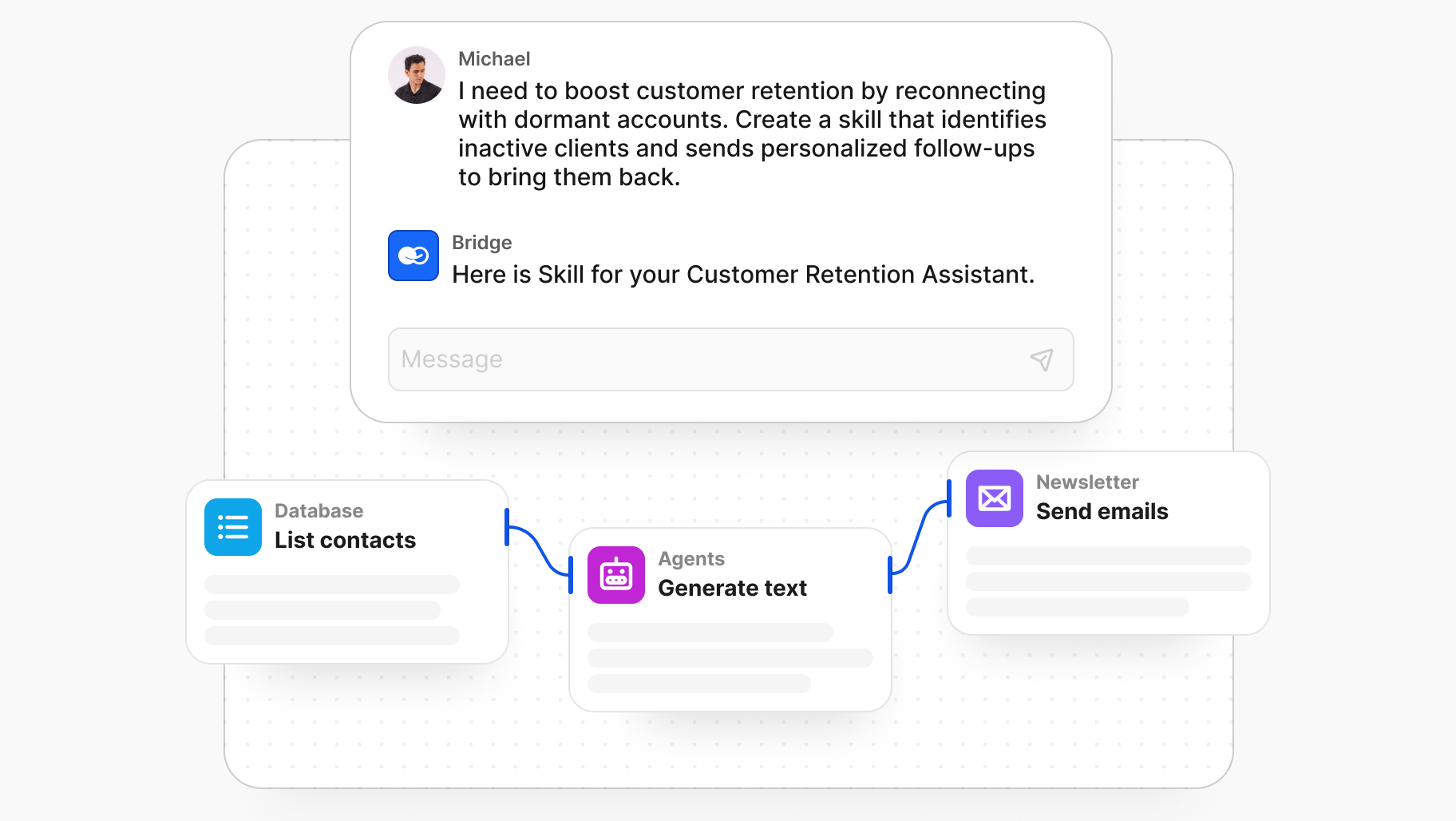
BridgeApp is a collaboration OS designed for AI-dense teams: chat, threads, audio calls, Kanban-style task boards, databases, a shared knowledge hub, and AI agents working alongside live team members. It’s built for product companies, agencies, and ops-heavy orgs that care about context and want agents to actually act on their data, not just summarize it.
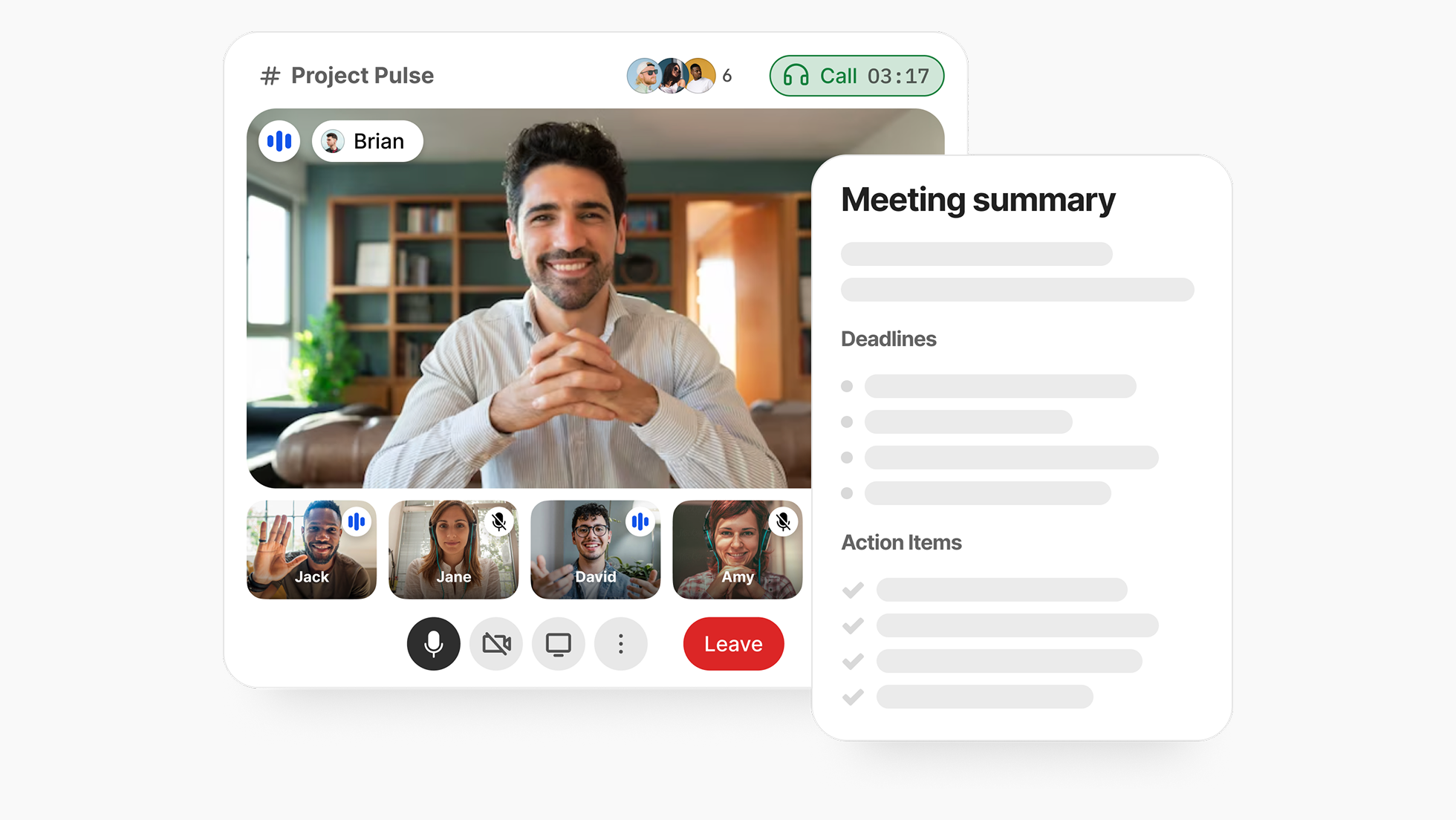
BridgeApp treats your workspace as a structured graph: conversations, tasks, databases, and documents become the context for AI assistants you can “hire” into specific roles and @-mention to help automate work. A separate AI Copilot works across the whole workspace, orchestrating flows across tools via integrations, using BridgeApp as its system of record.
For data-sensitive teams, BridgeApp can run as SaaS or be deployed on-prem or in a private cloud, giving you strong data control options and helping you maintain complete control over team communication.
BridgeApp offers a generous free plan with unlimited users and access to all core modules — messenger, documents, a task tracker with backlog and a Kanban view, an AI-agent builder, databases, and calls.
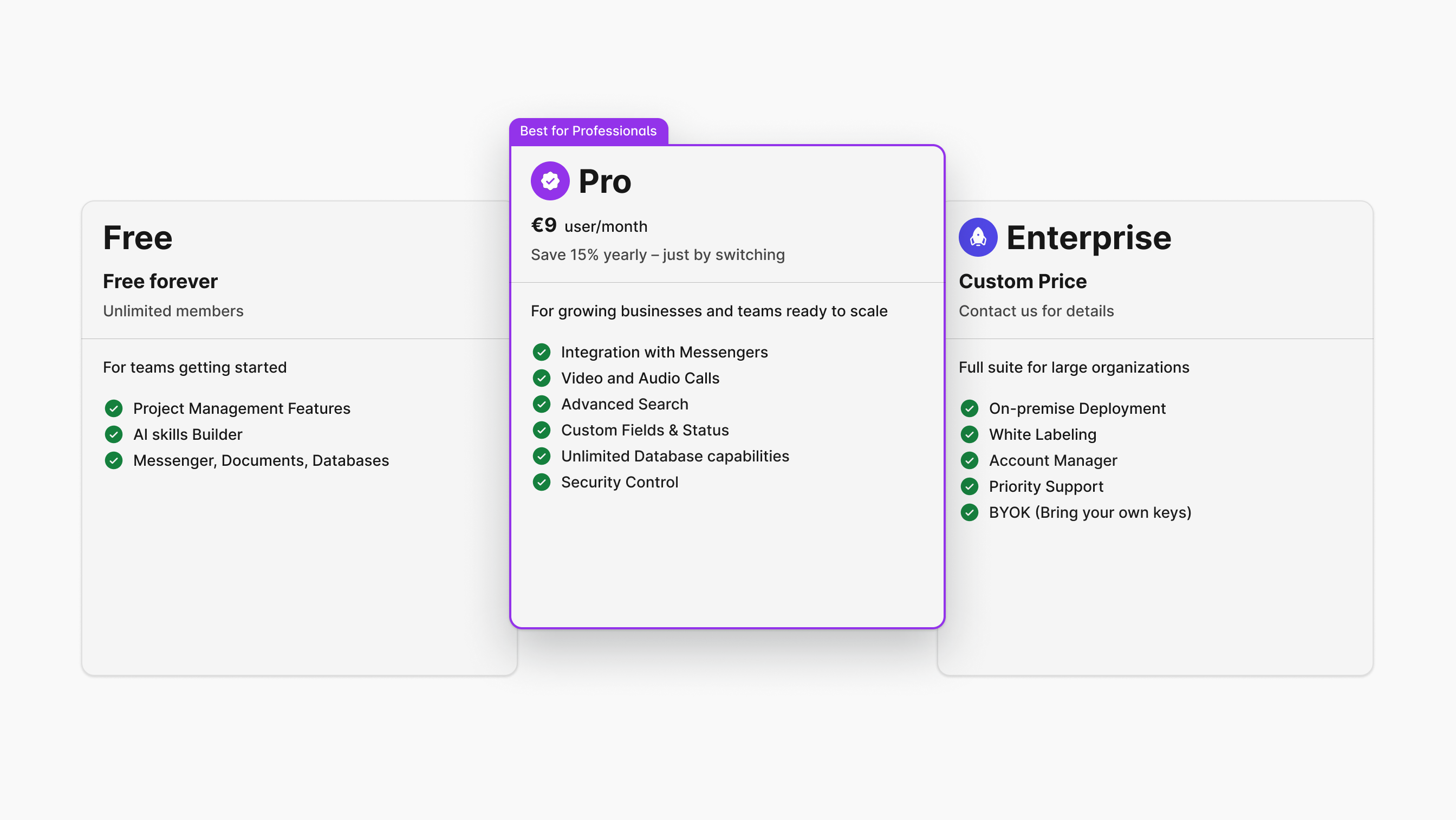
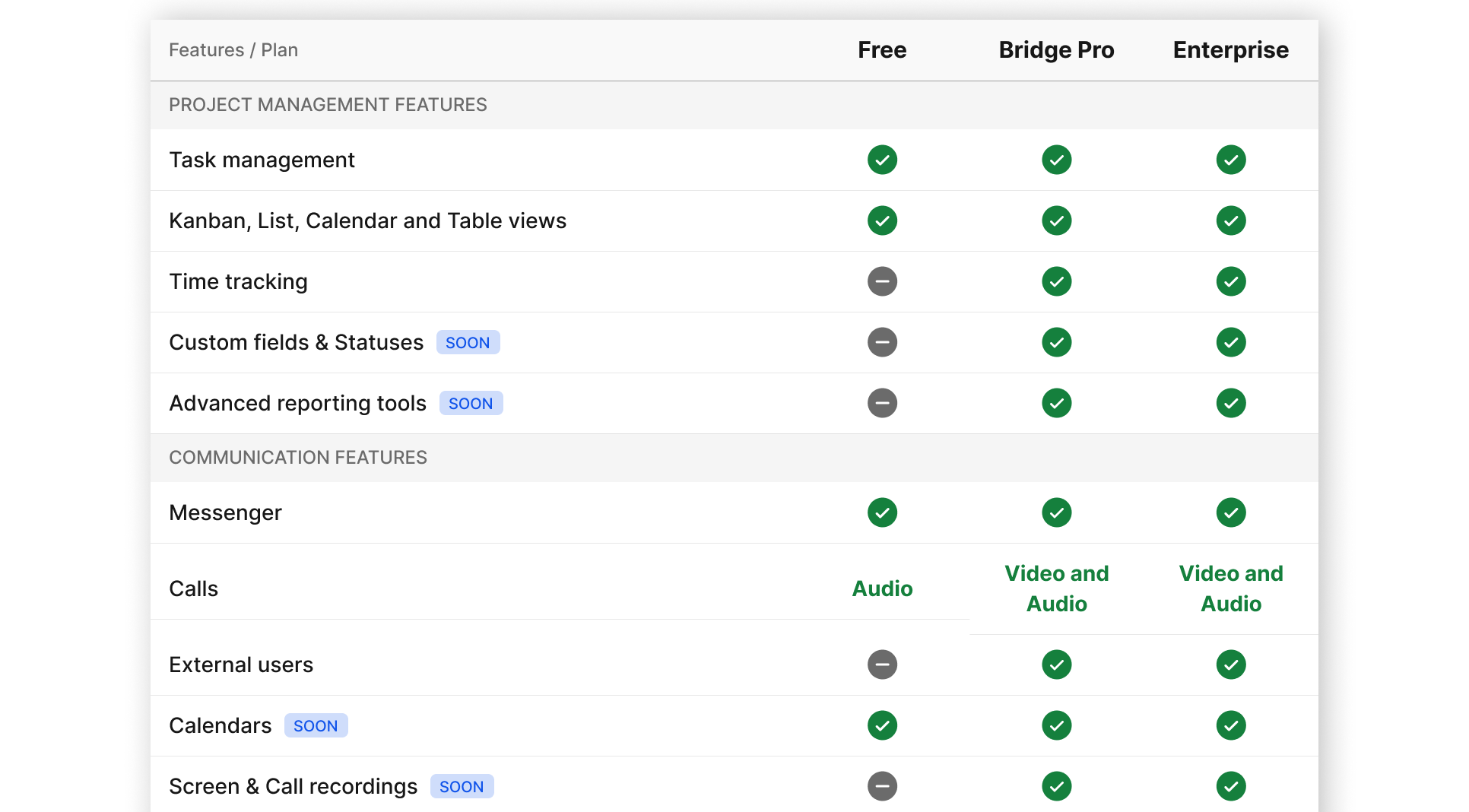
Pro costs €9 per user per month (or €90 per user annually), and includes a built-in CRM, messenger integrations, role-based access control, unlimited database capacity, and advanced search. And yes, you can activate Pro with the full feature set at no cost during the trial period. The Enterprise plan is designed for large organizations. Pricing starts at €19 per user per month and, in addition to everything in Pro, adds white-label branding, a dedicated account manager, priority support, and an uptime SLA.
Microsoft Teams — the Microsoft 365-native work hub
Teams is an “everything in one pane” hub for companies already standardized on Microsoft 365: chat, channels, meetings, storage, tasks, and calendars tightly wired into familiar Microsoft apps, familiar to the point of teeth grinding: Outlook, and the whole Office bundle. You get group chats and team channels, voice/video meetings with screen sharin,g and SharePoint — all living in the same client as your files and calendars. Task management runs through Planner / Tasks, Loop components, and channel tabs: boards, checklists, and lightweight project spaces that sit inside Teams channels.
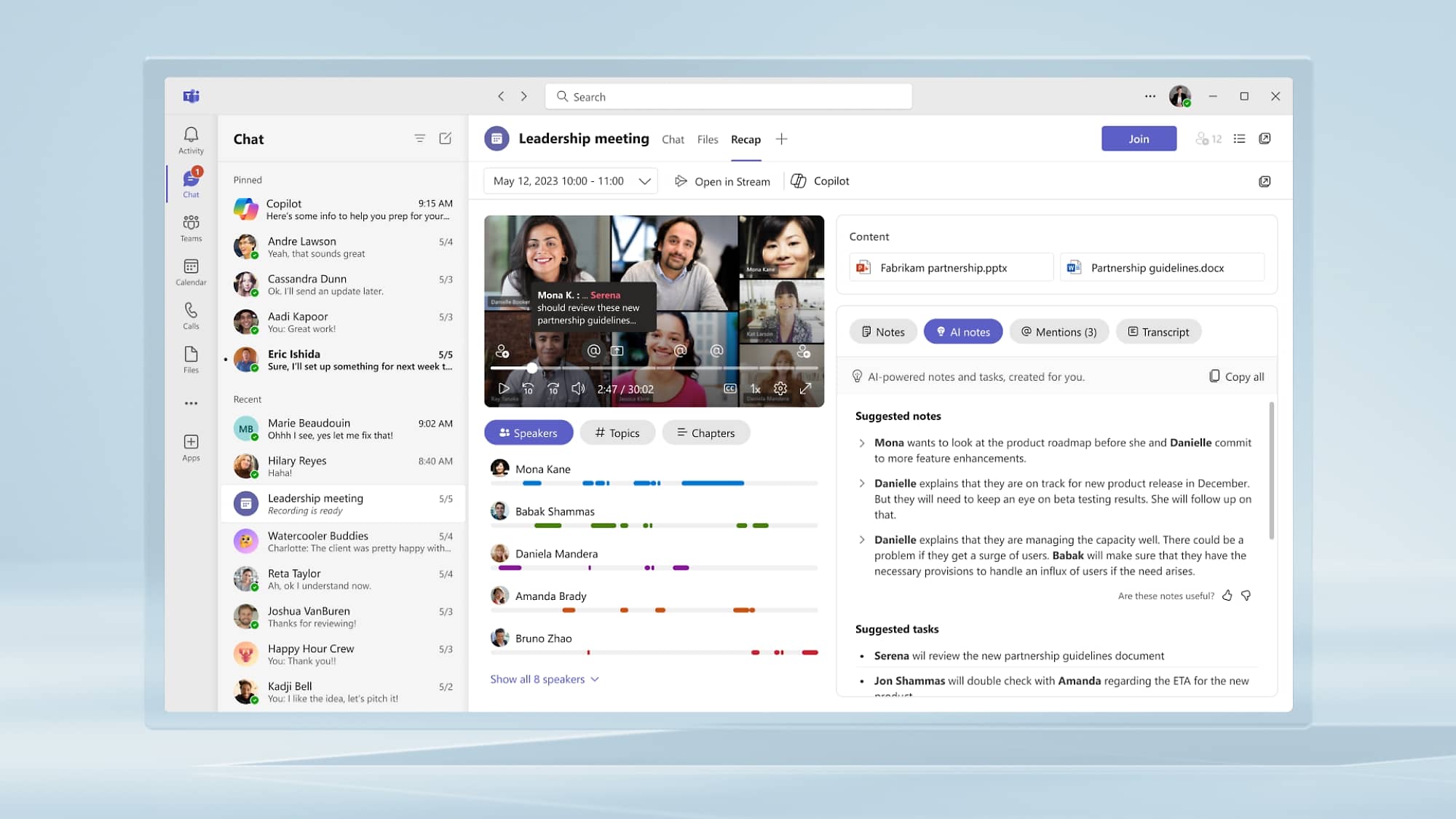
Copilot for Microsoft 365 sits inside Teams chat and meetings, summarizing discussions, drafting replies, extracting action items, and searching across your 365 data as a unified knowledge surface. You can also plug in line-of-business apps and bots from the Marketplace, turning Teams into a front end for a ton of internal and external APIs.
Teams comes as a standalone business product (Teams Essentials at about US$4 per user per month) or bundled with Microsoft 365 Business plans from roughly US$6 to US$22 per user per month, depending on which Office apps and security features you need. Overall, Microsoft offers quite tangled licensing that hides the real cost until you’ve onboarded the whole company. Copilot is an extra AI license in roughly the US$18–$30 per user per month range, depending on Business vs. Enterprise editions.
Google Workspace — Google Chat and Docs for teams “living in the browser.”
Google Workspace is the natural Slack alternative for teams already living in Gmail, Docs, and Sheets: Google Chat and Spaces give you persistent rooms, while the rest of Workspace provides the docs, files, and meetings.
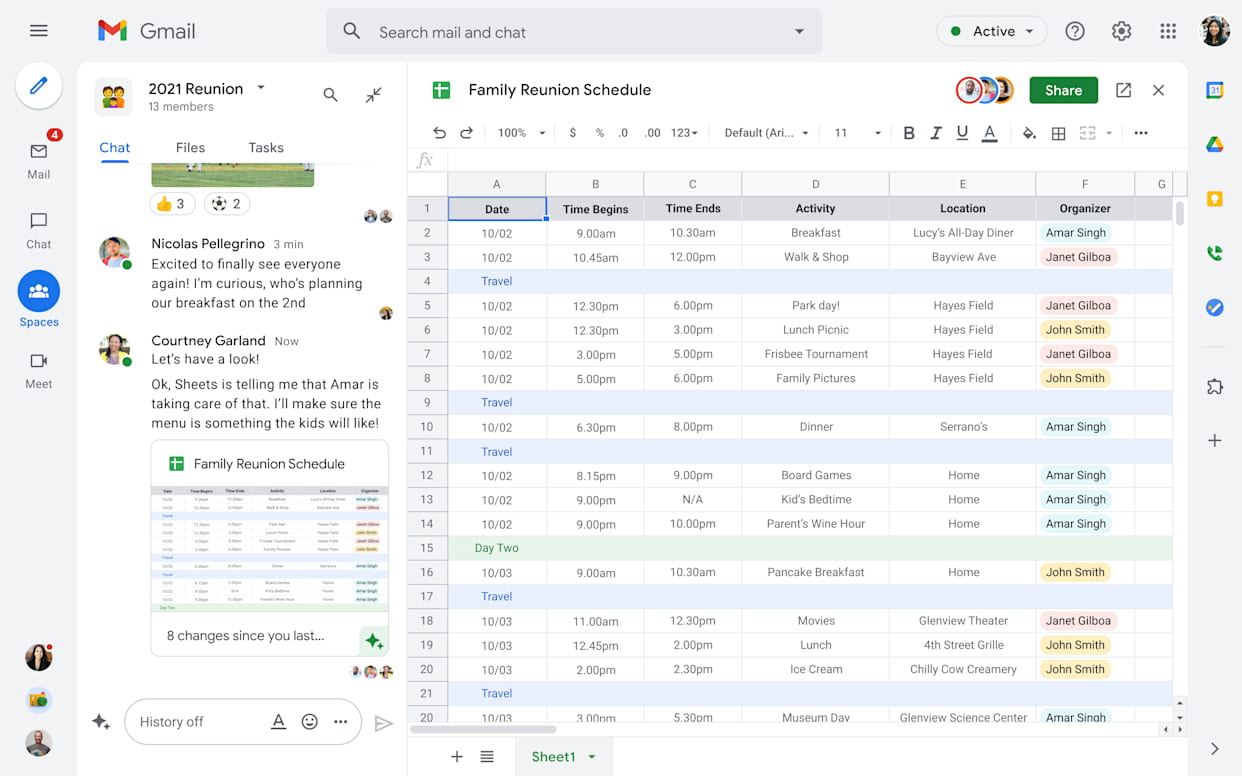
Spaces give you topic- or team-based rooms with threaded group conversations, inline replies, and Meet links one click away. They can also pin task lists; teams often use Kanban-like boards inside shared Sheets, or drive work from Google Tasks and Docs-based checklists. It’s not a full-blown PM suite out of the box, more of a basic to-do and coordination layer, but for many cross-functional teams it becomes a lightweight project backbone.
Gemini for Workspace is now wired into the whole range of Google workspace apps — Docs, Sheets, Slides, Drive, and Meet — and is included in Business and Enterprise plans as of 2025. Gemini is enabling teams to analyze Sheets, recap Meet audio and video calls, and answer questions based on your Workspace content. This effectively turns the Workspace corpus into an AI-ready knowledge base, though you’ll need to tweak settings and get used to Gemini’s sometimes idiosyncratic way of handling tasks.
Google Workspace users enjoy Business plans starting at around US$7 per user per month (Business Starter), US$14 (Business Standard), and US$22 (Business Plus), with Enterprise on a quote basis.
ClickUp — a Slack alternative with a perpetual free version
ClickUp pitches itself as the “one app to replace them all”: tasks, docs, whiteboards, dashboards, forms, and basic chat in a single, heavily configurable workspace. It's designed well and is useful for teams that want to manage their backlog, roadmap, and operations in one place, rather than spreading things out.
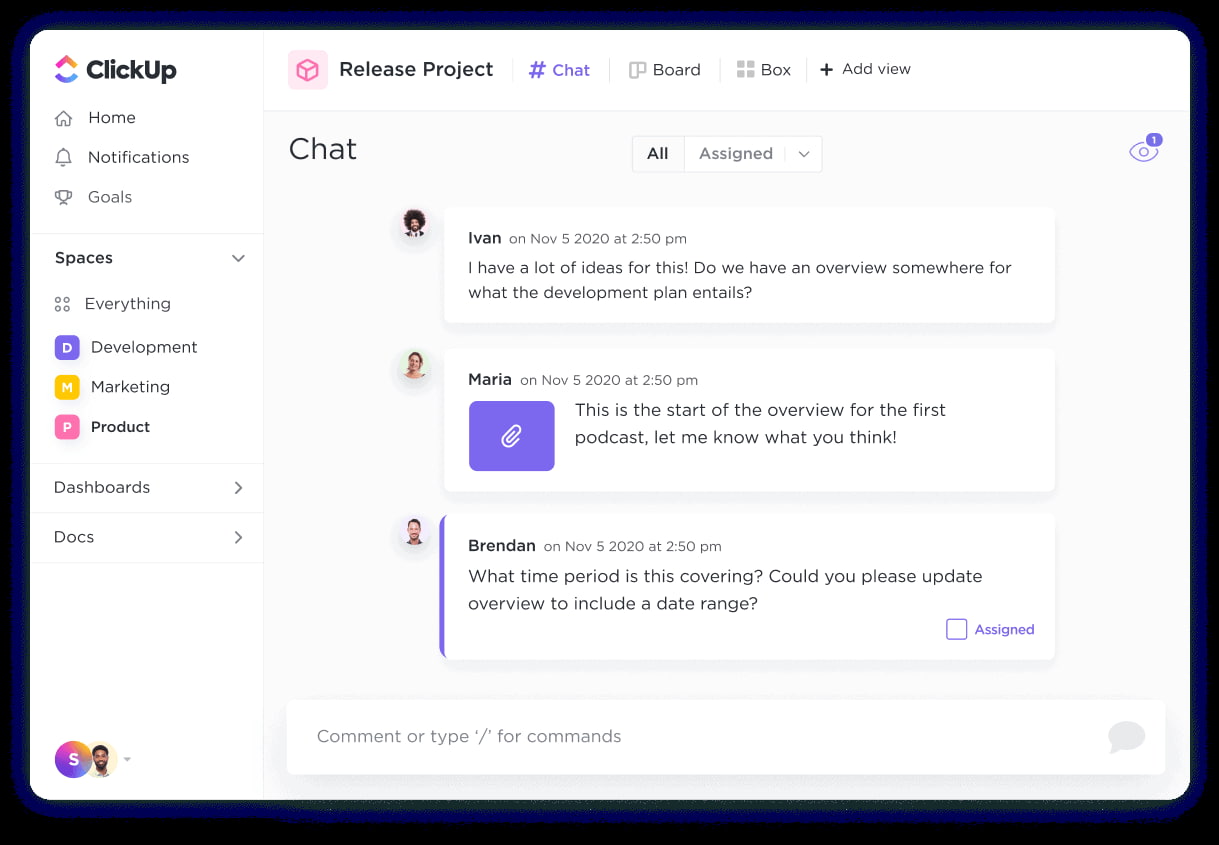
Project and task management are ClickUp’s home turf: multi-level hierarchies (workspaces, spaces, folders, lists), boards and timelines, goals, time-tracking, and reporting, which can scale from small product squads to large agencies and ops-heavy organizations. Communication lives in task comments and a simple in-app Chat view for quick coordination. It’s not striving to be a full Slack clone, but it does cut down on context-switching between discussions and work items.
ClickUp Docs act as a knowledge base linked directly to tasks. ClickUp Brain, its AI layer, can summarize tasks and docs, draft updates, pull context across the workspace, and answer questions about projects — effectively treating your tasks and documents as an AI-readable database.
ClickUp offers a free version (Free Forever tier), with paid plans like Unlimited and Business typically in the ~US$7–$19 per user per month range, depending on features and billing. ClickUp Brain is an extra AI add-on sold per user on top of the core plans.
Notion — modular docs that grew into an AI-powered work OS
Notion started as a beautifully minimal notes-and-docs tool and has evolved into a flexible “second brain” for tech-driven teams: pages, wikis, databases, project boards, and now AI agents all live in one block-based system.
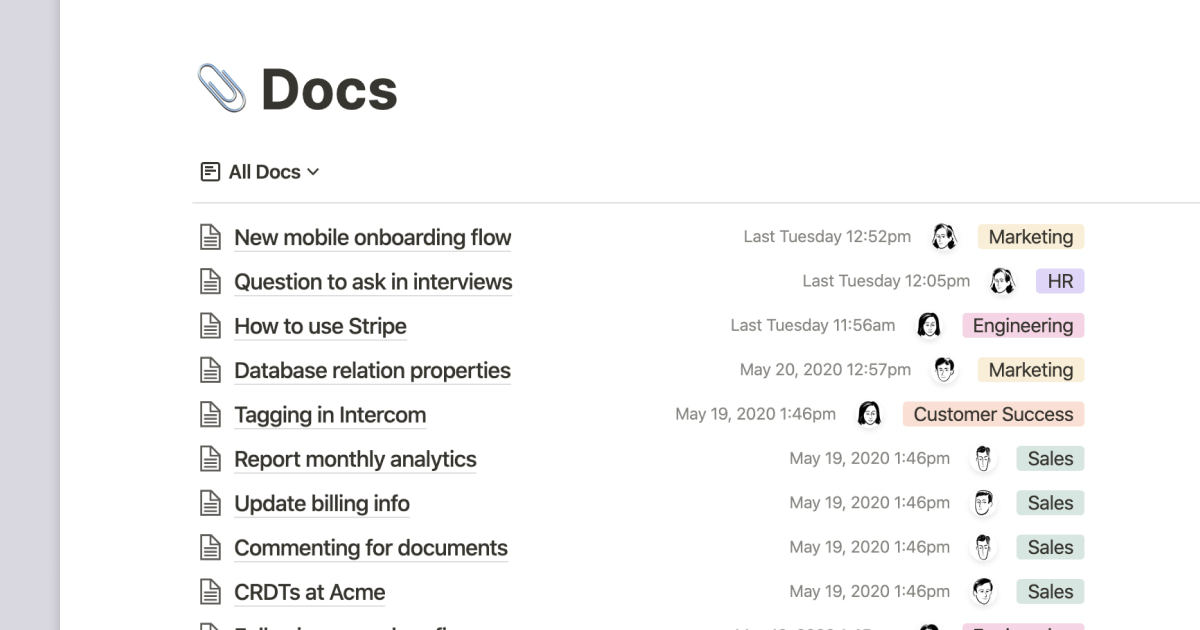
Designed as a second brain for wild ideas, deep work, and hustling startup plans, Notion allows you to create custom dashboards, link documents to tasks (and tasks to documents), create wikis, and remix templates quickly. Task tracking runs on databases with board, table, timeline, and calendar views. You can model backlogs, content calendars, CRM pipelines, or OKR dashboards with custom properties, filters, and relations, and then slice the same data into different “views” for different stakeholders.
People communicate through comments, in-line discussions, and page-level conversations. Many of teams use Notion as an internal wiki and a lightweight asynchronous communication tool, sometimes with a dedicated chat app. A lot of people have complained, though, that when they tried to move from Slack, it replaced half of their Slack usage, not the whole thing. For every geeky superfan, there’s a crew of confused average users nursing a headache from Notion’s feature sprawl.
AI is deeply integrated: it can summarize pages, generate drafts, translate, refactor content, and answer questions across your workspace. The system lets you create custom assistants that pull from Notion databases and connected tools, acting like specialized teammates embedded in your knowledge graph and using your docs as their primary context.
Notion has a free plan for individuals and small teams; paid Plus and Business plans are typically around US$8–$15 per user per month. Notion AI is an add-on billed per member per month on top of the base plan.
Mattermost — open, self-hosted collaboration for high-security teams
Mattermost positions itself as a secure, self-hostable collaboration platform built for DevOps, security, and regulated environments that can’t put their chat and incident data in a public cloud by default.
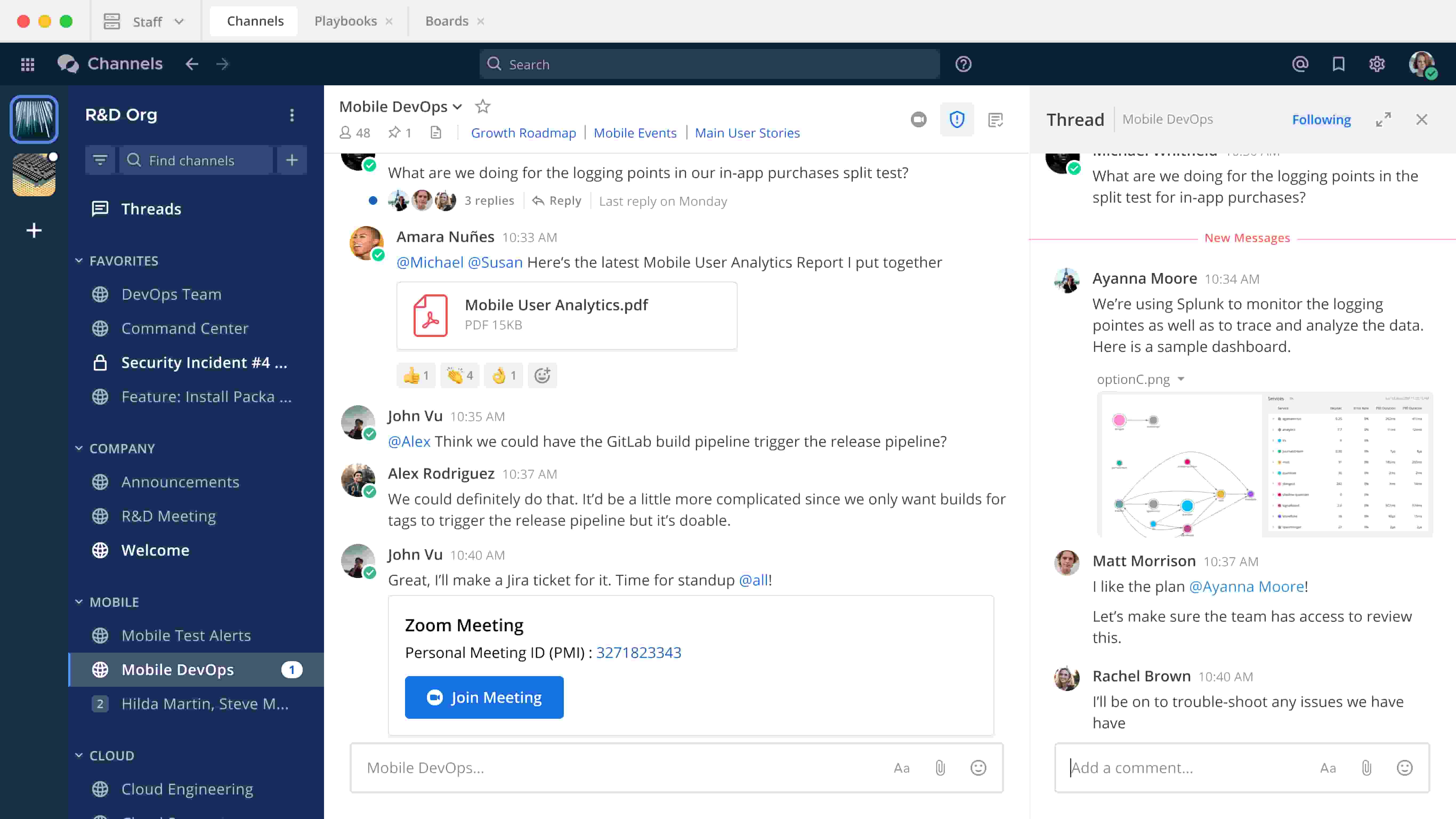
On the group communication side, it offers channel-based messaging, shared files, threaded discussions, and optional calls and screen sharing — all deployable behind your own firewall and wired into your existing identity stack.
Project management is covered by Mattermost Boards and Playbooks. Boards give you Kanban views and cards for everyday work; Playbooks provide runbooks and checklists for incidents and repeatable workflows — a natural fit for SRE, incident response, and operations-heavy teams.
On the AI and data side, Mattermost is moving toward an “Intelligent Mission Environment”: AI assistants can sit on top of channel history, boards, and playbooks, with the option to connect to self-hosted AI models and external search. That lets teams turn their internal docs and operational records into context for secure AI assistance, including air-gapped deployments where nothing leaves the network.
There is a free on-prem edition, plus Professional and Enterprise subscriptions. Public pricing for Professional is around US$10 per user per month, while Enterprise is quote-based; both are sold as annual seat subscriptions, with options to run on-prem or in a dedicated cloud.
Rocket.Chat — secure internal communication for governments and infra
Rocket.Chat calls itself a secure CommsOS for mission-critical operations. It’s used by government agencies, defense, and critical infrastructure organizations that need messaging, voice, video conferencing, and AI under strict compliance regimes.

Communication features include channels, DMs, voice and video calls (including integrations with Jitsi / Zoom), and omnichannel customer messaging. Increasingly, Rocket.Chat also leans on Matrix-compatible federation, so organizations can talk across boundaries without depending on a single vendor’s cloud.
Rocket.Chat is communication-first. For project and task tracking, teams usually connect third-party apps for project and task tracking (like Jira, Asana, etc.) and use Rocket.Chat as the ChatOps layer on top.
Self-hosted AI models can enrich the platform with proprietary data so AI assistants answer from internal knowledge rather than public LLMs. Bots can assist in incident workflows, all while respecting strict data residency and air-gapped deployment requirements.
For secure team collaboration, Rocket.Chat offers a free version for small self-managed workspaces. A Pro plan recently cost US$8 per user per month when billed annually, but now the site lists that option as custom pricing, along with the Enterprise license. There’s also a separate pricing track for “Citizen Engagement” deployments, also not openly published by the company.
monday.com — fancy visual calendar events
monday.com’s rainbow color-coded dashboards try to make the project manager trendy. That pitch clearly lands. By the mid-2020s it was sitting in the project management software camp, with hundreds of thousands of customers using it to coordinate marketing campaigns, product roadmaps, service queues, and internal projects.
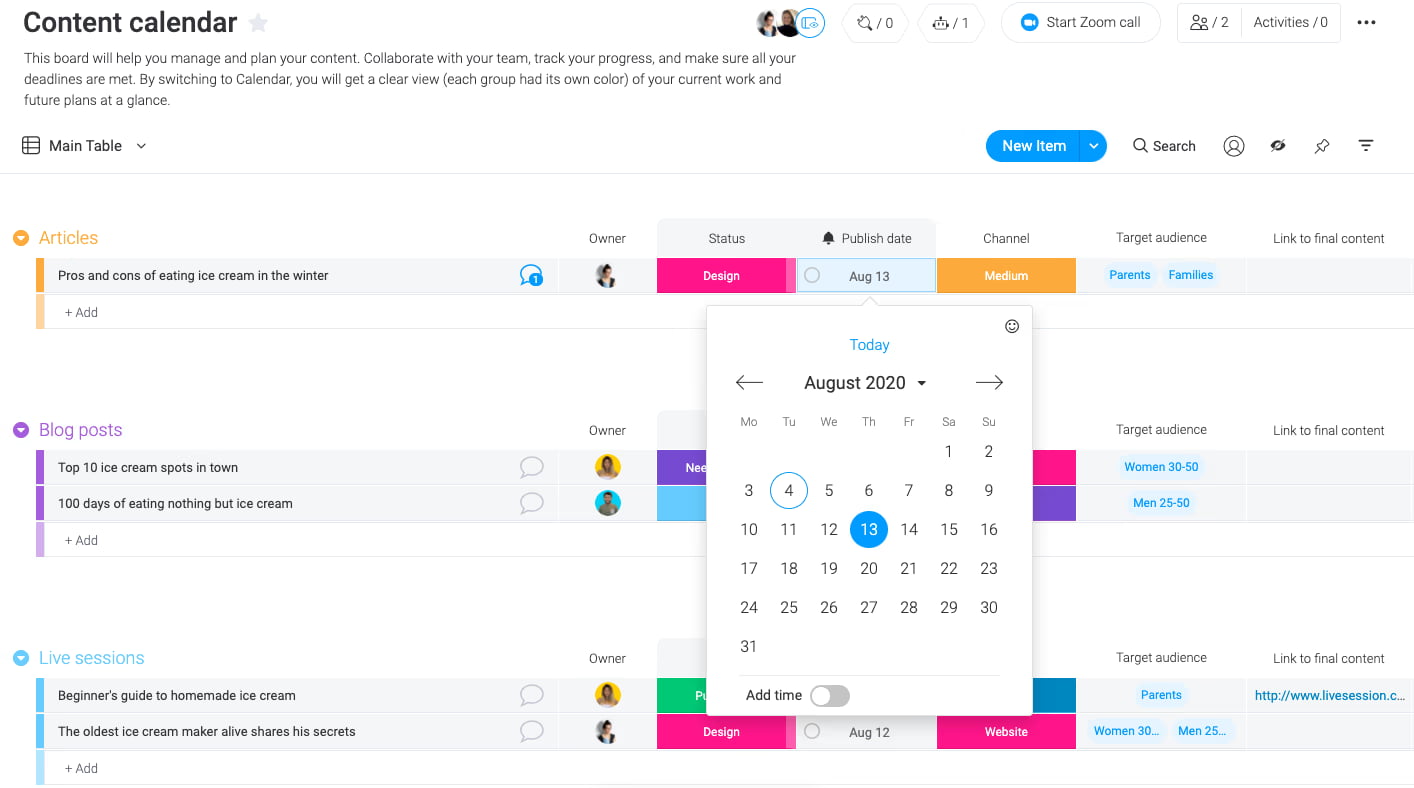
Discussion in monday.com is glued to the work itself. Each item lives on a board with an Updates stream where people @-mention teammates, drop files, and react, so the running commentary sits right next to statuses and dates instead of drifting off into a separate chat tool. It’s closer to “social feed on each task” than a full Slack replacement, but for many teams, that’s enough.
Boards are effectively structured spreadsheets, which you can flip into Kanban, timeline, Gantt, calendar, workload, or dashboard views. Automations fire on status changes or dates (think “when this moves to ‘Done’, notify finance”), and tons of integrations are able to pull data in from CRM, dev tools, or support systems so boards become the default view of what’s happening.
Pricing is very public and very tiered. There’s a free plan with a small number of seats and boards, then Basic, Standard, and Pro tiers that start at roughly €9, €12, and €19 per seat per month billed annually (or about US$9/12/19), with Enterprise on a custom quote. Advanced features with AI ride on a credit model layered on top of those plans, with some starter credits included.
Radar-Mapped Key Features of Slack Competitors
To assess all these Slack alternatives, we used the same Radar Map logic as in our other guides: a single visual scorecard across several key criteria.
- Interface & UX – How intuitive is the interface? Do new team members “get it” quickly, or is there a steep learning curve?
- Performance – Does the app stay responsive with large workspaces, video calls, and heavy integrations? Some platforms feel noticeably snappier than others in day-to-day use.
- Security features & data control – Pure SaaS, or can you go self-hosted / on-prem / private cloud with clear role-control guarantees? For many teams, the critical decision point isn’t the sleek design or emoji set; it’s whether they can control their data.
- Collaboration features – Channels, threads, group messages, task links, built-in task-manager capabilities, voice and video chats. And: how well can all that be integrated with task management and document collaboration?
- AI & automation – Copilots, AI agents to automate tasks, and dedicated workflow builders that go beyond simple “if this, then notify that” rules.
- Admin & governance – Role policies, guest access, audit logs, unlimited users vs. per-seat limits. We also look at how easy it is to export or archive your history.
- Price & licensing clarity – Free plan depth, paid plan structure, add-ons, and total cost of ownership over a year or two, not just the headline price.
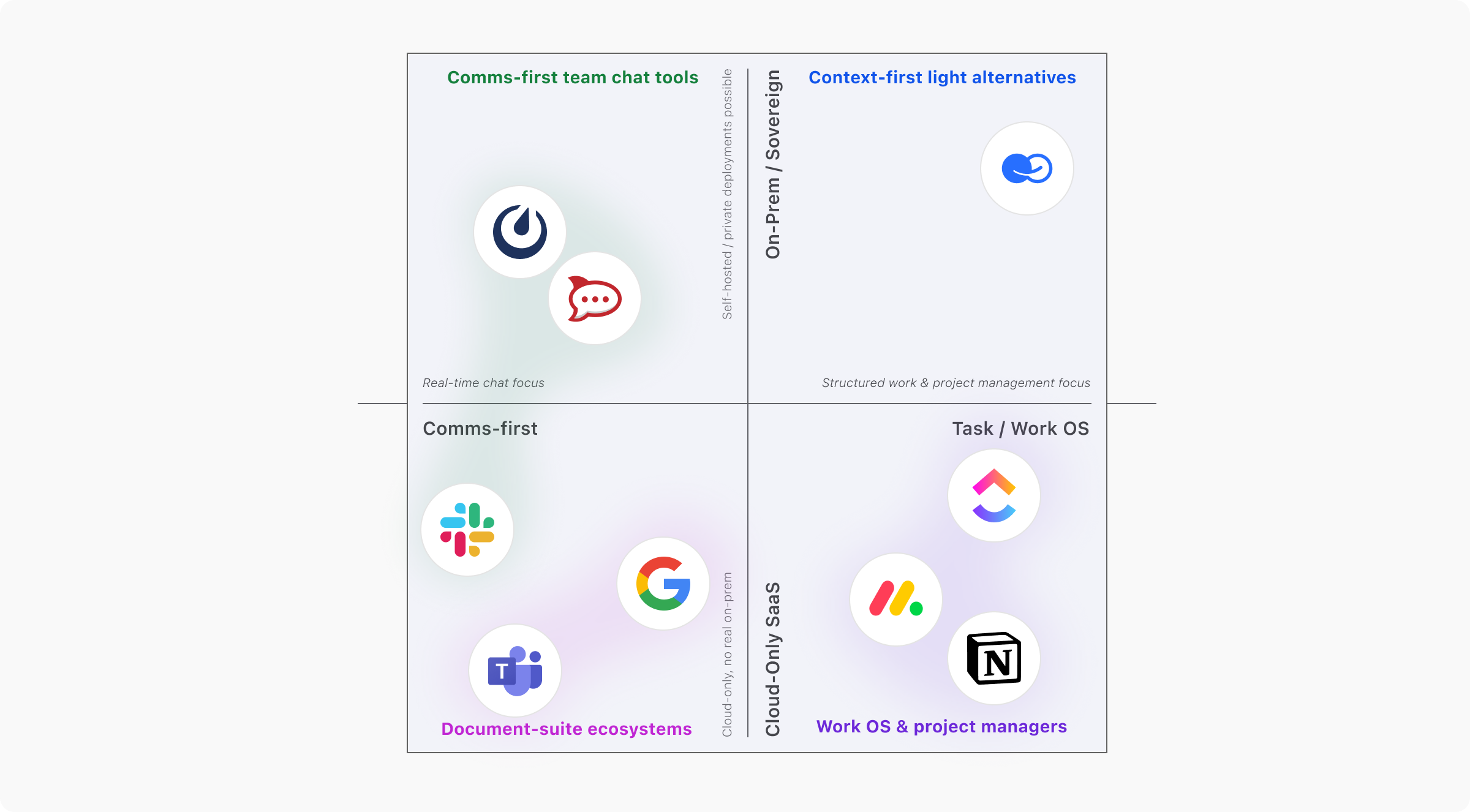
Quick Scorecard – Best Slack Alternatives for Different Team Needs
The Slack alternatives we’ve covered in this article fall into four clear clusters. This scorecard is here to help you avoid rambling in the dark and to quickly see which type of platform actually fits your team.
- Document-suite ecosystems – Microsoft Teams, Google Chat: corporate big-tech suites with complex, multi-layer licensing and convoluted pricing, and effectively no true on-prem options.
- Comms-first team chat tools – Zoom Workplace, Rocket.Chat, Mattermost: strong at real-time conversation, increasingly adding light task tracking.
- Work OS & project managers – ClickUp, monday.com, Notion: chat is secondary; built-in task management, workflows, and roadmaps come first.
- Context-first light alternatives – BridgeApp and similar platforms that treat chat as just one layer on top of tasks, databases, and knowledge hubs.
Can I Switch Tools Without Losing Context?
Slack will remain a powerful collaboration hub for many organizations. It has a mature ecosystem, a familiar UX, and a long runway of AI features coming through Salesforce’s stack.
Still, Slack is not always a perfectly rational choice. Some teams can no longer afford to live with a SaaS-only hosting model and simply hope their data stays safe and private, with nobody peeking into sensitive channels.
The world of remote collaboration now demands more specialized solutions, sometimes precisely tailored to production needs. Teams that work remotely and use a lot of artificial intelligence need more than just an active chat stream. They need deployment options that go beyond SaaS — from private-cloud and hybrid setups to fully self-hosted environments. Tasks shouldn't be in a separate app; they need to be tightly woven into the fabric of everyday communication. Hybrid teams also need a shared context, which includes databases, documents, and decision history, so that both people and AI agents are always working from the same, continuously growing body of knowledge.
That’s the gap BridgeApp is built to fill.
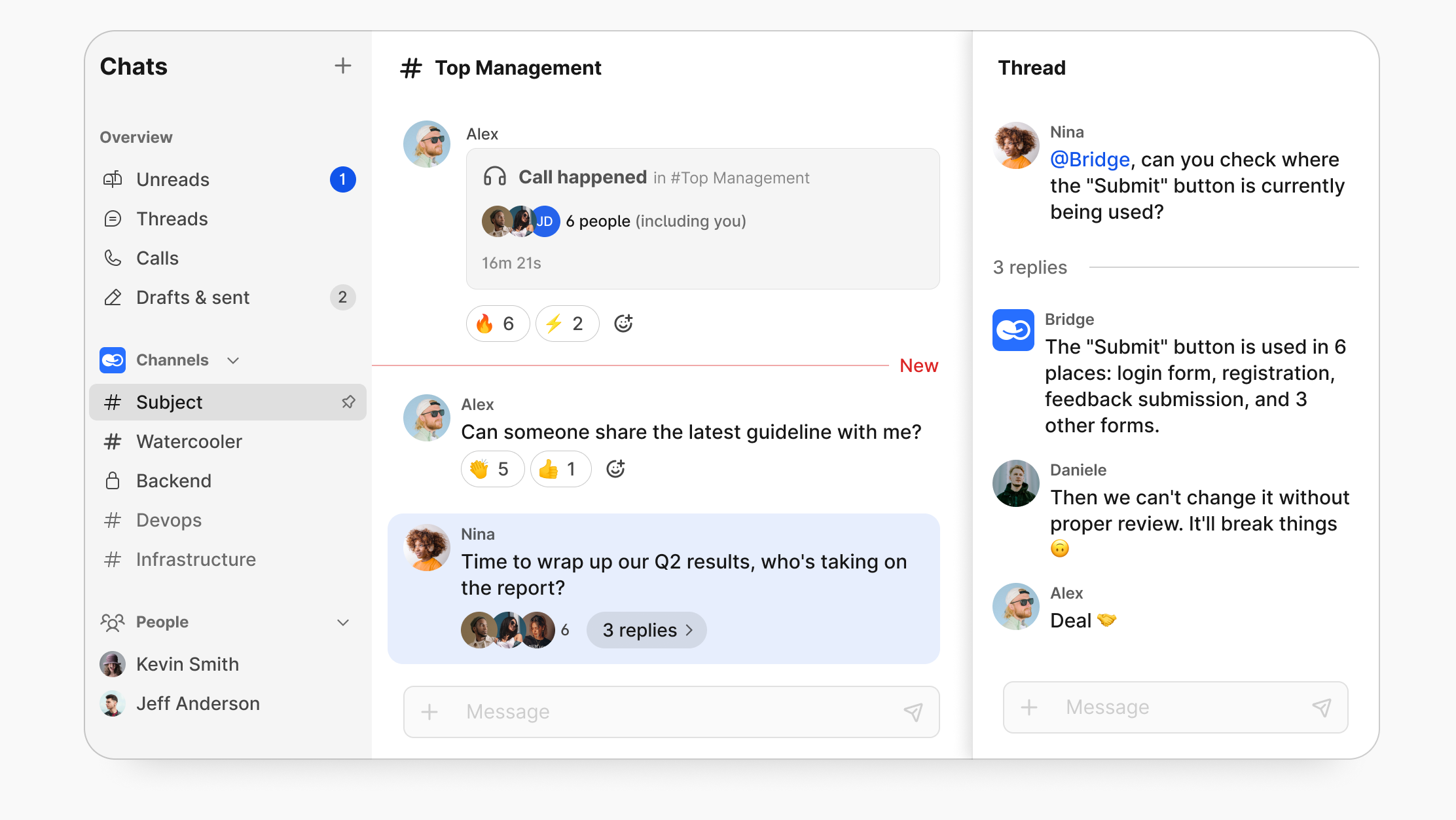
BridgeApp combines a team chat feature, task management, a Kanban board, a company knowledge hub, and live databases in the same workspace. It’s an excellent Slack alternative that borrows the good parts — channels, quick live conversations, reactions, automations, and integrations — but orients the entire experience around project management, context, and sovereignty.
A practical next step:
Spin up BridgeApp for your core squad — product, engineering, ops — or connect it to the tools you already rely on with help from the support team.
Sign up to try it for free, or contact the BridgeApp team to plan a migration from Slack without losing context.