BlogIndustry Insights
A Complete Guide to Model Context Protocol (MCP): Architecture, Integration, and Best Practices

BridgeApp Team
7 min read
What Is MCP (Model Context Protocol)?
Model Context Protocol (MCP) is an open standard introduced by Anthropic in November 2024 that defines how AI models securely connect with external tools, databases, and services.
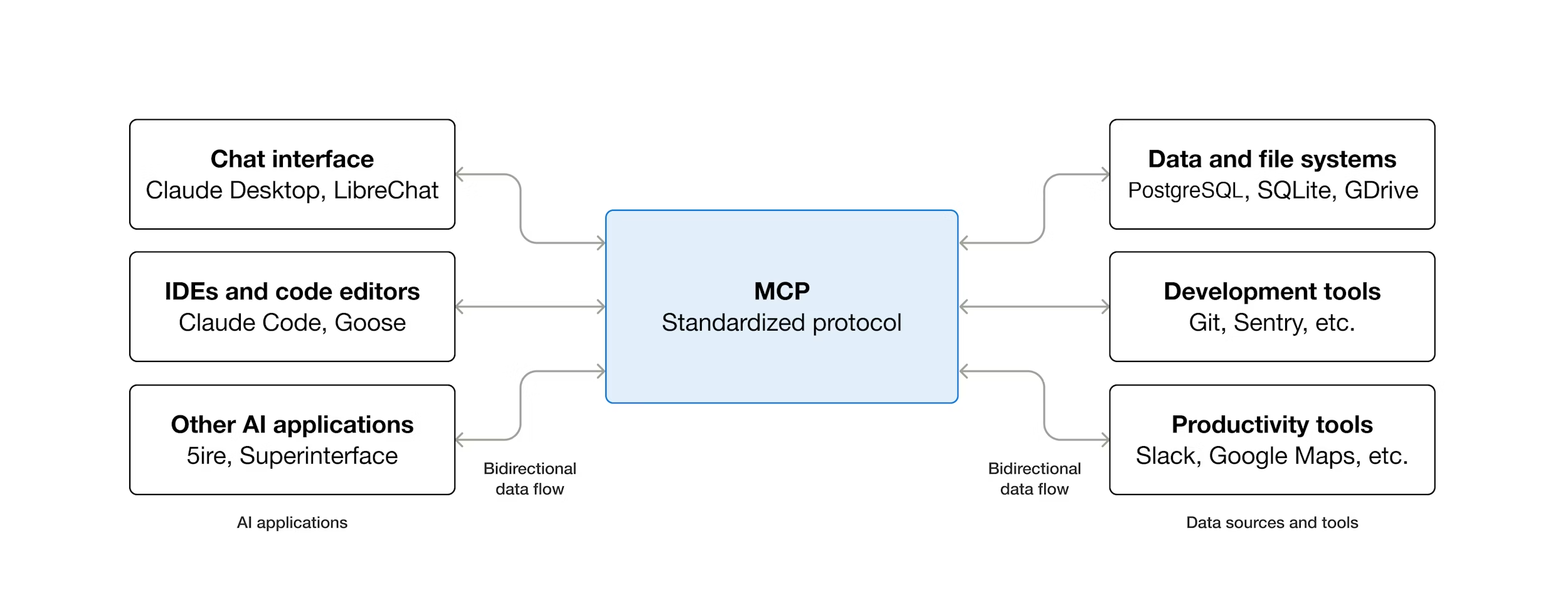
Think of MCP as the USB-C of AI integrations: one universal standard that lets any AI application connect to any data source or tool — without custom adapters for each pair.
Large language models (LLMs) are highly capable at reasoning and text generation, but they have a fundamental limitation: they cannot access real-world data or invoke external tools on their own. MCP was designed to solve exactly this problem.
Unlike a simple API wrapper, an MCP server does far more than translate HTTP calls. It manages session state, enforces access control, exposes a structured menu of capabilities, and ensures that AI models receive accurate, timely, and contextually relevant information.
Quick definition: MCP is a client-server protocol built on JSON-RPC 2.0 that allows AI applications to discover and call external tools and data sources through a single, standardized interface.
MCP Architecture and Components
At its core, MCP defines a client-server architecture built on JSON-RPC 2.0 — an open and lightweight remote procedure call standard.
This design solves the classic N×M problem: connecting N different AI models to M different data sources without writing N×M custom adapters.
The MCP architecture consists of four primary components:
- MCP Host
- MCP Client
- MCP Server
- Transport Layer
Transport Layer
MCP servers can communicate:
- Locally via stdio — for same-machine deployments
- Remotely over HTTP (Streamable HTTP) — for distributed systems
Remote connections require HTTPS with proper authentication. Local connections are suitable for developer environments or tightly controlled deployments.
MCP Host
The MCP host is the top-level application environment where an AI assistant operates. Examples include:
- IDEs
- Chat interfaces
- Autonomous agent frameworks
The host is responsible for:
- Discovering available MCP servers
- Orchestrating requests to those servers
- Surfacing permission prompts for sensitive operations
At session startup, the host performs a discovery handshake to learn which tools, resources, and prompts are available. For risky actions (e.g., writing to a filesystem), the host enforces human confirmation and oversight.
MCP Client
The MCP client lives inside the host and maintains a one-to-one connection with a single MCP server.
Its responsibilities include:
- Translating high-level intent into JSON-RPC requests
- Registering server capabilities
- Normalizing and relaying responses back to the host
At session start, the client performs capability registration, querying the server for available methods and caching them for inference-time use.
Supported SDKs
Official SDKs are available for:
- Python
- TypeScript
- Java
- Kotlin
- C#
Example: Initializing an MCP Client in Python
from mcp import ClientSession, StdioServerParameters
from mcp.client.stdio import stdio_client

server_params = StdioServerParameters(
    command="python",
    args=["my_mcp_server.py"]
)

async with stdio_client(server_params) as (read, write):
    async with ClientSession(read, write) as session:
        await session.initialize()
        tools = await session.list_tools()
        print(tools)
MCP Server
The MCP server is the external service that provides data, context, or capabilities to the LLM. It sits between the AI model and underlying systems such as:
- Databases
- APIs
- SaaS platforms
- Filesystems
Core Capabilities Exposed by MCP Servers
- Tools — executable actions (e.g. SQL queries, GitHub issues)
- Resources — read-only data (schemas, files, KB articles)
- Prompts — predefined instruction templates
Example: Defining a Tool in an MCP Server
from mcp.server import Server
from mcp.server.models import InitializationOptions
import mcp.types as types

server = Server("my-server")

@server.list_tools()
async def list_tools() -> list[types.Tool]:
    return [
        types.Tool(
            name="get_sales_summary",
            description="Fetch last month's sales data from the database",
            inputSchema={
                "type": "object",
                "properties": {
                    "month": {
                        "type": "string",
                        "description": "Month in YYYY-MM format"
                    }
                },
                "required": ["month"]
            }
        )
    ]
MCP vs API vs Function Calling
| Feature | Traditional API | Function Calling | MCP |
|---|---|---|---|
| Standardization | Custom per service | Model-specific | Universal |
| Discovery | Manual docs | Static schema | Runtime |
| Multi-tool support | Custom per N×M | Limited | Built-in |
| Session/state | App-side | None | Server-side |
| Open standard | No | No | Yes |
| Vendor lock-in | High | Medium | Low |
Key distinction:
Function calling invokes a function inside one application. MCP allows any MCP-compatible AI app to discover and call any MCP server dynamically at runtime.
Access Control and Security
Security is foundational in MCP deployments.
Best practices include:
- HTTPS for remote servers
- API keys, tokens, or OAuth for authentication
- Scoped permissions per tool method (least privilege)
For risky operations (writes, deletes, outbound messages), MCP servers should require explicit permission prompts, ensuring human oversight even in automated workflows.
MCP Inside BridgeApp: Turning Your Workspace into an Agentic System
With native MCP support, BridgeApp becomes a fully interoperable environment where AI agents, tools, and data operate within a single context layer. Now it is possible to integrate any of your tools via MCP to build complex workflows powered by our AI engine. Connect your existing tools once. From that point on, we handle the complex, multi-step workflows that used to eat up your team's time: routing requests, updating records, triggering actions across systems, and keeping every department in sync, automatically.
How do you connect an external MCP server in BridgeApp?
The short answer: it's in Agents → MCP Servers, and it takes about two minutes.
The longer answer starts with what actually happens when you connect. You paste the MCP server URL — usually found in the provider's docs — choose the authentication type the server requires, and BridgeApp does the rest. It automatically fetches every available method from that server and lists them with descriptions. You see exactly what the integration can do before you build anything with it.
Authentication options cover most common setups: no auth, authorization code, client credentials, workspace token, user token, or workspace auth code — depending on what your provider supports.
To make it concrete: we connected Ahrefs for our marketing team. Created an analytics agent. Gave it access to the Ahrefs MCP. The agent now pulls live search data and answers SEO questions right inside BridgeApp, in the same chat where the rest of the work happens.
MCP Integrations With AI Systems and AI Agents
MCP enables AI agents to:
- Read files
- Query databases
- Call external APIs
- Write results back to source systems
All within a single workflow, without custom integration code.
Common MCP clients include:
- Coding assistants
- Autonomous agent frameworks
- Enterprise chatbots
- RAG pipelines
Typical Agent Integration Flow
- Register MCP server capabilities
- Provide rich metadata for each tool
- Invoke tools via MCP client during inference
Better metadata improves tool selection reliability.
Function Calling and Agentic AI
MCP formalizes and extends function calling by exposing tools through a unified, discoverable interface.
This enables true agentic behavior:
- Read user intent
- Select tools
- Execute actions
- Decide next steps autonomously
MCP also supports elicitation — requesting missing inputs before execution — and maintains session memory across multiple tool calls.
MCP Integration Patterns
Database Servers
Expose safe, parameterized query methods instead of raw SQL.
Filesystem Servers
Provide scoped read/write access using root directories.
SaaS Integrations
Handle auth, rate limiting, and data normalization internally while exposing a clean interface to the AI model.
Best Practices for MCP Servers
- Clear JSON Schema documentation
- Structured error codes
- Strict input validation
- Rate limiting
- Dynamic composability and modular design
These practices allow MCP servers to scale across complex, multi-agent systems.
Data Sources and External Data
Each data source should be registered with:
- A clear response schema
- Validated outputs
- Scoped access (e.g., filesystem roots)
This reduces hallucinations and enforces least privilege.
Observability and Monitoring
Track:
- Latency percentiles per tool
- Error rates
- Active sessions and cache hits
- Throughput under load
End-to-end tracing is critical for debugging agent behavior.
Deployment: Local vs Remote MCP Servers
Local Deployment
Best for developer tools and controlled environments.
Remote Deployment
Best for enterprise systems and multi-user platforms.
Production considerations:
- Autoscaling
- Caching
- Fault tolerance and redundancy
FAQ: Model Context Protocol
What is Model Context Protocol (MCP) in simple terms?
Model Context Protocol (MCP) is an open, standardized way for AI models and AI agents to securely interact with external tools, databases, APIs, and services.
In simple terms, MCP acts as a universal bridge between AI and the real world. Instead of hardcoding integrations for each tool, MCP allows AI applications to dynamically discover, understand, and use external capabilities through a single protocol. This makes AI systems more flexible, scalable, and reliable.
Who created MCP and why was it introduced?
MCP was introduced by Anthropic in November 2024 as an open standard.
The motivation behind MCP was to solve a growing problem in AI engineering: modern AI systems need access to live data and tools, but existing approaches (custom APIs and function calling) do not scale well. MCP was designed to:
- Reduce integration complexity
- Eliminate vendor lock-in
- Enable safe, agentic AI workflows
- Standardize AI-to-tool communication
Although created by Anthropic, MCP is not proprietary and is intended for broad industry adoption.
Is MCP open source and vendor-neutral?
Yes. MCP is both open source and vendor-neutral.
- The protocol specification is public
- Reference implementations are community-maintained
- Any company or individual can implement MCP servers or clients
This openness is critical for avoiding ecosystem fragmentation and ensuring that MCP can be used across different AI models, frameworks, and infrastructure providers.
How is MCP different from a traditional API?
A traditional API requires developers to write custom integration code for each client and each use case. This quickly leads to brittle systems and duplicated effort.
MCP differs in several key ways:
- Dynamic discovery: AI models can discover tools at runtime
- Standardized interface: No custom adapters per integration
- Server-managed context: State and permissions are handled centrally
- AI-first design: Schemas and metadata are optimized for LLM reasoning
In short, APIs are built for humans and applications. MCP is built for AI systems.
What is the difference between MCP and LLM function calling?
Function calling allows an LLM to invoke predefined functions within a single application. These functions are usually hardcoded and tightly coupled to the app.
MCP goes much further:
- Tools are exposed by external servers, not embedded in the app
- Capabilities are discovered dynamically at runtime
- MCP works across vendors, languages, and platforms
- Session state and permissions are managed server-side
Function calling is a feature. MCP is an ecosystem-level protocol.
Can MCP work with any AI model or LLM?
Yes. MCP is model-agnostic.
It works with:
- Claude
- GPT models
- Gemini
- Open-source LLMs
- Any model that supports tool use or structured output
MCP does not depend on a specific model architecture. As long as an AI system can interpret tool schemas and produce structured calls, it can use MCP.
What problems does MCP solve for AI agents?
MCP enables AI agents to move beyond static text generation and become action-capable systems.
Key problems MCP solves:
- Safe access to live data
- Reliable tool invocation
- Persistent session memory
- Permissioned execution of actions
- Scalable multi-tool orchestration
This makes MCP foundational for agentic AI, where systems plan, act, observe results, and iterate autonomously.
What are MCP tools, resources, and prompts?
MCP servers expose three primary capability types:
- Tools: Executable actions (e.g. database queries, file writes, API calls)
- Resources: Read-only data sources (files, schemas, documents)
- Prompts: Predefined instruction templates for consistent model behavior
This separation improves safety, clarity, and reasoning quality for LLMs.
How does MCP handle security and access control?
Security is a core design principle of MCP.
Best practices include:
- HTTPS for remote MCP servers
- API keys, tokens, or OAuth authentication
- Fine-grained permissions per tool method
- Explicit user approval for risky operations
MCP follows a least-privilege model, ensuring AI systems only access what they are explicitly allowed to use.
Can MCP maintain context and memory across sessions?
Yes. MCP servers can maintain session-level state and memory.
This allows:
- Multi-step workflows
- Long-running agent tasks
- Context persistence across multiple tool calls
Session management is handled server-side, making AI agents more reliable and less brittle.
How does MCP reduce hallucinations in AI systems?
MCP reduces hallucinations by:
- Enforcing structured schemas for inputs and outputs
- Providing explicit tool and data contracts
- Validating responses before returning them to the model
- Limiting access to well-defined resources
By constraining what the model can see and do, MCP improves factual grounding and execution reliability.
What are common use cases for MCP?
Typical MCP use cases include:
- AI coding assistants
- Enterprise chatbots
- Autonomous AI agents
- RAG pipelines with live data
- Internal developer tools
- Workflow automation systems
Anywhere AI needs safe, structured access to external systems, MCP is applicable.
Is MCP suitable for enterprise and production systems?
Yes. MCP is designed for production-grade deployments.
Enterprise features include:
- Authentication and authorization
- Observability and tracing
- Rate limiting and quotas
- Horizontal scalability
- Fault tolerance
MCP can be deployed locally for sensitive environments or remotely for large-scale platforms.
How does MCP help with scalability and maintenance?
MCP dramatically reduces integration overhead:
- One MCP server can serve many AI clients
- New tools can be added without client-side changes
- Integrations are modular and composable
This lowers long-term maintenance costs and enables faster iteration as AI systems evolve.
Is MCP becoming an industry standard?
MCP is rapidly emerging as the default standard for AI-to-tool connectivity.
It has already been adopted by:
- AI development environments
- Agent frameworks
- Coding assistants
As AI systems become more agentic and action-oriented, standardized protocols like MCP are increasingly necessary.
Should developers and teams learn MCP now?
Yes. Teams that understand MCP early gain a strategic advantage.
MCP knowledge helps with:
- Building scalable AI platforms
- Designing safe agentic workflows
- Avoiding vendor lock-in
- Future-proofing AI architectures
As AI moves from generation to execution, MCP becomes foundational infrastructure.