BlogIndustry Insights
AI Project Management for Remote Teams in 2026

BridgeApp Team
5 min read

AI project management for remote teams is transforming how we collaborate, making workflows more efficient and less chaotic. In this guide, we’ll explore essential definitions, emerging trends, and comparisons of the best tools tailored for distributed teams. This is particularly crucial for team leaders and beginners as we approach 2026, where AI will play a pivotal role in overcoming the unique challenges of remote work, such as time zone differences and asynchronous communication. You'll leave equipped with actionable insights and practical tools to enhance your team's productivity.
What is AI project management for remote teams in 2026?
AI project management for remote teams in 2026 refers to the use of artificial intelligence technologies to streamline and enhance project management processes specifically for distributed teams. This involves leveraging advanced AI capabilities such as autonomous agents, asynchronous workflows, and cross-platform automation to address the unique challenges faced by remote teams, including time zone differences and communication barriers.
In contrast to traditional project management, which often relies heavily on manual processes and real-time collaboration, the AI-enhanced approach of 2026 emphasizes automation and intelligence. For instance, autonomous agents can manage routine tasks like scheduling and resource allocation, freeing up project managers to focus on strategic decisions. Asynchronous workflows enable team members to collaborate effectively across different time zones without the need for constant real-time communication. This shift not only improves efficiency but also enhances productivity by minimizing interruptions and context-switching, a common challenge in remote work environments
Why does AI project management matter for remote success?
AI project management is crucial for remote teams because it directly enhances productivity, reduces delays, and streamlines communication across time zones. In fact, studies suggest that AI can reduce project delays by up to 30% for distributed teams, making it an essential tool for executives and operations leads aiming to drive efficiency in a remote environment.
Here are the top three ways AI contributes to remote team success:
- Automation of Routine Tasks: AI automates repetitive project management tasks, such as scheduling meetings or tracking progress, allowing team members to focus on higher-value activities instead of getting bogged down in manual processes. For instance, tools like Trello use AI to automatically assign tasks based on team members' workloads, ensuring fair distribution.
- Enhanced Communication: AI facilitates asynchronous communication by providing real-time updates and notifications, which are vital for teams spread across different time zones. Tools like Slack and Microsoft Teams leverage AI to summarize conversations and highlight important decisions, ensuring that no one misses critical information, regardless of when they log on.
- Risk Mitigation: AI helps identify potential project risks before they escalate, providing teams with predictive insights based on historical data. This capability allows leaders to proactively address issues, ensuring smoother project execution across borders. For example, AI-driven analytics can alert teams about potential bottlenecks in workflows, enabling timely interventions.
In 2026, we can expect even more advanced capabilities in AI project management, such as predictive workload balancing that adjusts team assignments based on real-time data and global notifications that inform team members of project updates, no matter where they are located. These innovations will further empower remote teams to collaborate effectively and maintain productivity, setting the stage for a new era of project management.
Which AI project management tools work best for remote teams in 2026?
When it comes to managing projects in a distributed environment, not all AI project management tools are created equal. To help you make an informed choice, we've developed a "Remote-Readiness Scorecard," which evaluates tools based on their effectiveness for remote work. The criteria include asynchronous collaboration capabilities, time zone management, global integration, and the depth of AI agent functionalities. Here are our top picks for remote team project management tools in 2026.
1. BridgeApp
Remote-Readiness Score: 9/10
Key AI Features: BridgeApp focuses on reducing context switching—reporting a 60% reduction—and automates routine tasks, saving teams approximately 4.6 hours per week.
BridgeApp is an all-in-one workspace designed to unify the tools teams use every day and support daily work with AI-powered agents across chats, tasks, knowledge, and databases.
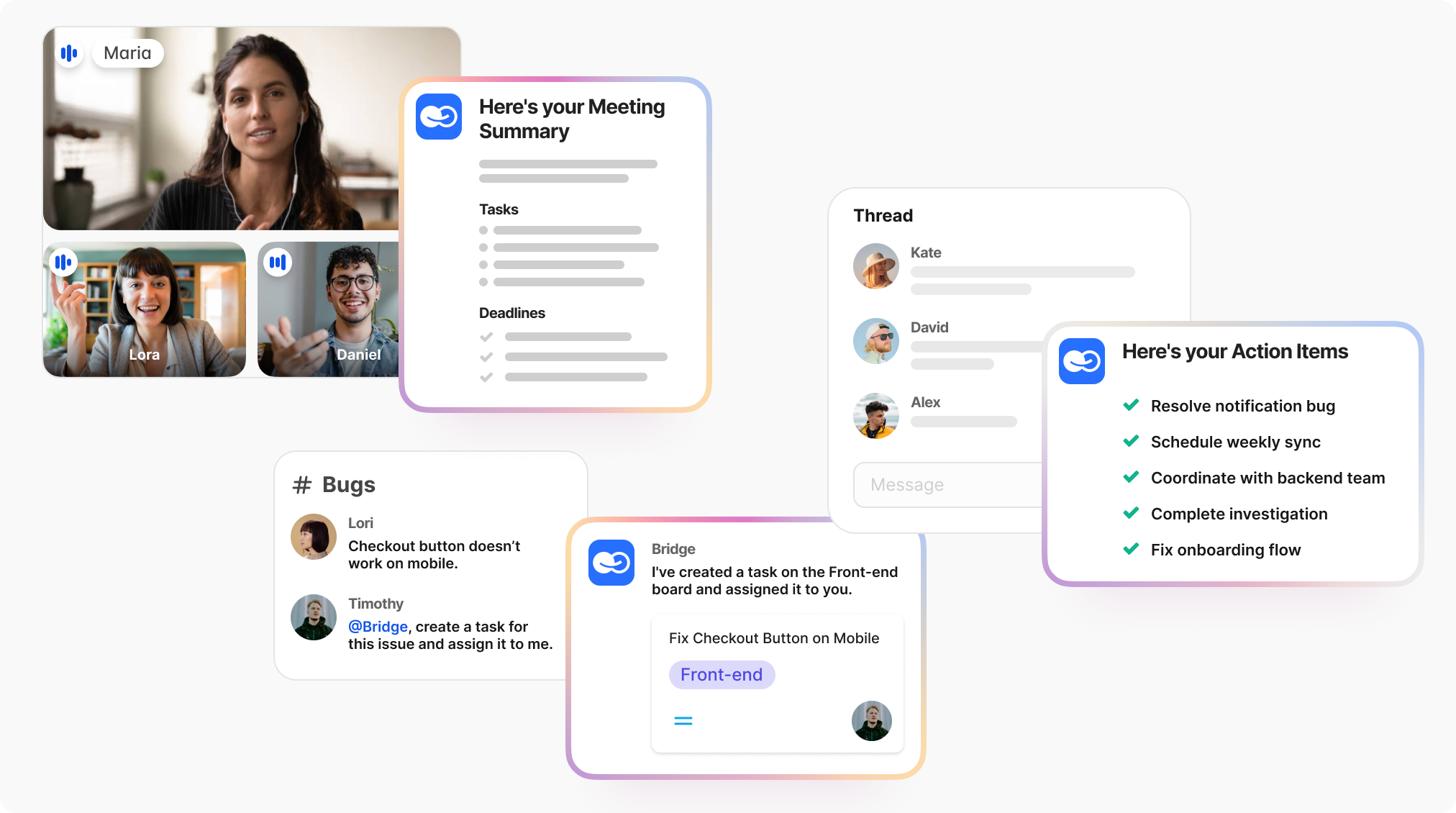
Remote Strengths: The platform excels at integrating communication and task management, effectively solving the issue of "tasks lost between chat and project management." Its workflow-first solution emphasizes efficiency and clarity, making it ideal for teams that juggle multiple platforms.

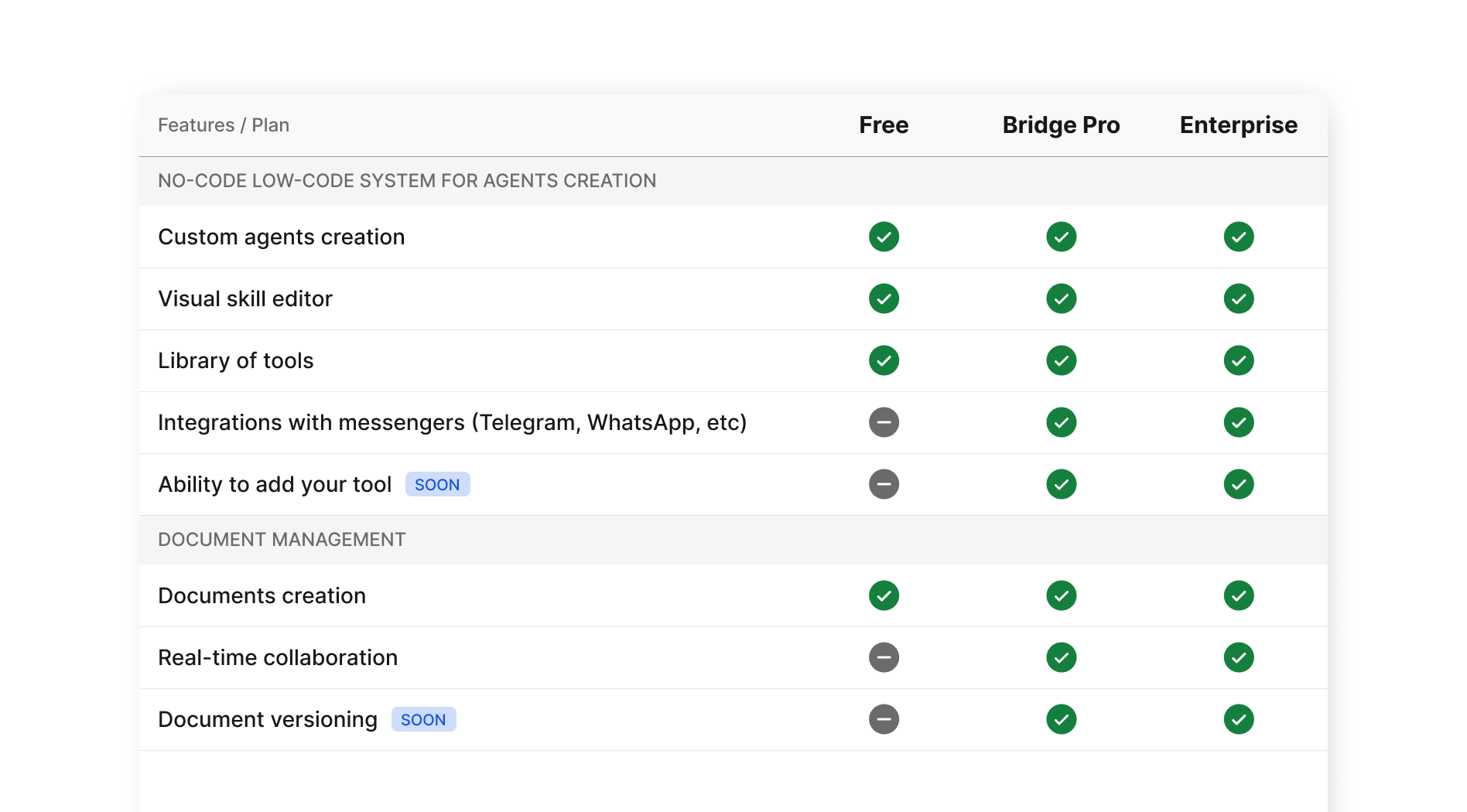
Pricing (2026): Starts with the Free Forever plan
Best For: Global teams and SMBs looking for a robust solution that minimizes disruption and maximizes productivity.
2. Asana
Remote-Readiness Score: 8/10
Key AI Features: Asana leverages AI for smart project suggestions and predictive workload balancing, ensuring that tasks are assigned based on team availability and skill sets.
Remote Strengths: The tool’s strong integration capabilities with various communication platforms like Slack and Microsoft Teams make it particularly suited for async collaboration.
Weaknesses: While it offers great features, new users may find the initial setup and onboarding process a bit overwhelming.
Pricing (2026): Pricing begins at $10.99/user/month, with a free tier available for small teams.
Best For: Mid-sized teams that need a comprehensive project management tool with strong collaborative features.
3. ClickUp
Remote-Readiness Score: 7.5/10
Key AI Features: ClickUp provides advanced automation options and AI-driven insights to help teams identify bottlenecks and streamline workflows.
Remote Strengths: The platform supports a wide range of integrations and features a “Time Zone” setting, which helps teams coordinate effectively across different locations.
Weaknesses: The extensive features can be overwhelming for users who prefer simplicity; it requires a learning curve.
Pricing (2026): Starts at $5/user/month, with a free plan available.
Best For: Teams that require a flexible tool that adapts to diverse workflows and extensive customization.
Quick Comparison Table
| Tool | Remote-Readiness Score | Key AI Features | Pricing (2026) | Best For |
| BridgeApp | 9/10 | 60% context-switch reduction, routine automation | Free Forever Plan Exists | Global teams, SMBs |
| Asana | 8/10 | Predictive workload balancing, smart suggestions | $10.99/user/month | Mid-sized teams |
| ClickUp | 7.5/10 | Advanced automations, bottleneck insights | $5/user/month | Flexible, customizable workflows |
These tools not only enhance productivity but also cater specifically to the unique challenges of remote work in 2026. By focusing on features that matter most for distributed teams, you'll be better equipped to select the right AI project management solution for your needs.
How do top AI PM tools compare for remote-specific features and pricing?
When it comes to managing remote teams effectively, not all AI project management (PM) tools are created equal. Different platforms offer a range of features that cater specifically to the challenges of distributed work, such as asynchronous communication, time zone management, and integration with collaboration tools. Here, we’ll compare some top AI PM tools based on essential metrics that matter for remote work.
BridgeApp stands out as a complete-stack alternative for remote teams, boasting a high remote-readiness score of 9. This is particularly significant given that it reduces context-switching by 60% and saves an average of 4.6 hours per week, which is critical for maintaining productivity in distributed settings. Its advanced time zone controls and comprehensive integration options make it a robust choice for teams operating across various regions.
On the other hand, ClickUp and Asana offer strong async support and several AI features, but they may require a bit more time to set up and master. ClickUp, while powerful, has a steeper learning curve, which may not be ideal for teams looking for a quick start. Meanwhile, Trello provides a user-friendly interface and a free tier, making it accessible, but its limited automation features may hinder larger teams needing complex workflows.
For those in need of specific compliance templates or industry-focused features, direct competitors may be more suited to particular workflows. For instance, while BridgeApp excels in workflow automation, tools like Asana might be preferred by larger organizations that require extensive project management capabilities.
In conclusion, here’s how the leading platforms compare on features that matter for distributed work. The choice ultimately depends on your team's unique needs, budget, and the level of complexity you’re prepared to handle.
How should a remote team choose the right AI project management tool?
Selecting the right tool is about fit, not feature count. For remote teams navigating the complexities of collaboration across time zones and varying work schedules, a structured evaluation process is crucial.
Here’s a straightforward five-step checklist to guide your selection:
- Identify Team Needs
Start by assessing your team’s unique requirements. What are the biggest pain points? Are you struggling with time zone coordination, asynchronous communication, or task prioritization? Understanding these needs will help you narrow down your options effectively. - Audit for Time Zone and Async Needs
Evaluate how well potential tools handle time zone differences and support asynchronous workflows. Look for features like global calendars and automated updates that keep everyone in the loop, regardless of when they are working. - Check Integration Capabilities
Your chosen tool should seamlessly integrate with the existing software your team uses (like Slack, Zoom, or Microsoft Teams). This will streamline workflows and enhance collaboration, making it easier for your team to adopt the new tool without massive disruption. - Evaluate Deployment and Security Features
Security is paramount, especially with sensitive project data. Consider how the tool handles user permissions, data encryption, and compliance with standards (like GDPR). A smooth deployment process with good support options will also ease the transition for your team. - Gather User Buy-In
Before making a final decision, involve your team in the evaluation process. Their feedback is invaluable and can help ensure that the tool aligns with user preferences and workflows, reducing resistance to change.
What 2026 trends will reshape AI project management for remote teams?
By 2026, a staggering 74% of remote teams will rely on AI-powered tools to manage their projects effectively. As we look ahead, several key trends are poised to reshape AI project management, particularly for remote teams. Here’s a snapshot of what to expect:
- Rise of Autonomous PM Agents: These AI-driven tools will take over repetitive tasks, enabling project managers to focus on strategic decision-making. Imagine an AI agent automatically scheduling meetings based on participants' time zones and availability—no more back-and-forth emails.
- Full-Stack Automation: From project initiation to completion, AI will streamline workflows across platforms. This means that teams can expect seamless transitions between tasks, reducing delays and enhancing productivity. For instance, automated status updates could keep everyone in the loop without requiring constant manual input.
- AI-Driven Risk Mitigation: With predictive analytics, AI will help identify potential project pitfalls before they arise, allowing teams to proactively address issues. This capability will be crucial for remote teams that face unique challenges, such as miscommunication across different time zones.
- Increased Demand for Credentialing and Certification: As AI becomes integral to project management, certifications like AI Project Management (AIPM) will gain importance. Companies will seek professionals who are not just familiar with traditional PM tools but also adept at leveraging AI for project success.
For example, the shift to asynchronous meeting summaries could revolutionize how teams communicate across different time zones. Instead of scheduling meetings that may not fit everyone's schedule, AI can generate concise summaries that all team members can access at their convenience.
What should remote teams do now to prepare for these changes? Start by evaluating existing project management tools for their AI capabilities and consider investing in training for team members on AI-driven tools. Emphasizing flexibility and adaptability in your team culture will also be vital as these trends evolve. As we move towards 2026, being proactive will not just keep you ahead of the curve; it will also position your team for greater success in an increasingly automated landscape.
What are the most common questions about AI project management for remote teams?
Will project managers be phased out by AI?
Short answer: No, project managers will not be phased out by AI; instead, their roles will evolve to focus on strategic decision-making and leadership.
AI is designed to enhance project management, not replace it. According to a report by McKinsey, 70% of executives believe AI will augment their work, leading to a shift from manual tasks to more strategic responsibilities such as stakeholder management and risk assessment. This means project managers will still play a critical role in guiding teams, making decisions, and leveraging AI insights to drive project success.
What are the 3 C’s for an AI-ready project manager?
Short answer: The 3 C’s are Clarity, Confidence, and Collaboration.
To thrive in an AI-enhanced environment, project managers need to possess clarity in their objectives, confidence in utilizing AI tools, and the ability to foster collaboration among team members. Clarity helps in defining project goals and expectations, confidence enables effective tool adoption, and collaboration ensures seamless communication and input across diverse teams, especially in remote setups. Embracing these C’s prepares project managers to leverage AI effectively in their workflows.
Is AIPM certification worth it?
Short answer: Yes, AIPM certification can be valuable for career advancement in project management.
The AIPM (AI Project Management) certification equips professionals with the skills to integrate AI tools into their project management practices. According to a recent survey, certified project managers reported a 20% increase in job opportunities compared to non-certified peers. This certification not only enhances one’s credentials but also demonstrates a commitment to staying current in a rapidly evolving field, which is crucial for those managing remote teams.
What is the best AI to use for project management?
Short answer: There is no single "best" AI; it depends on your team's specific needs.
Tools like BridgeApp, Monday.com, Asana, and Trello offer robust AI features tailored for project management, including task automation, scheduling, and analytics. For instance, Monday.com leverages AI to optimize workflows and enhance collaboration among remote teams. When selecting an AI tool, consider factors such as integration capabilities, ease of use, and specific features that address your team's unique challenges. According to Zapier, 70% of project managers prioritize user-friendly interfaces when choosing AI tools.
By addressing these common questions, we hope to empower you with actionable insights to navigate the evolving landscape of AI in project management for remote teams.
As we wrap up, don’t miss out on our free downloadable checklist designed to guide you through selecting the right AI project management tool for your remote team. Also, sign up for our newsletter to stay updated on the latest trends and insights for 2026 in AI project management. We're here to support you every step of the way, ensuring you have the resources you need for ongoing success.