BlogIndustry Insights
Understanding Jira Pricing: Choosing the Right Plan for Your Team

Konstantin BuzzResearch Lead
10 min read
In this post, we take a close look at the Jira ecosystem, which has expanded and evolved significantly over the past few years. Integrated AI, governance, and business management features have reshaped both what Jira is and how it is sold — and we’re unpacking exactly how.
Atlassian, the creator of Jira, began as one of the canonical product-led software companies. Forbes once highlighted it as a business software marvel that marketed $320 million worth of licenses without a single traditional sales representative. A decade later, the company has transformed into an AI-stuffed, all-in-one enterprise platform vendor. It now integrates Atlassian Intelligence to streamline software development. In its Q2 FY26 shareholder letter, the company reported $1.6 billion in quarterly revenue—its first-ever $1 billion+ quarter for Cloud—noting that its Rovo AI platform had surpassed 5 million monthly active users.
Yet, this financial velocity comes with turbulence: a month later, reports emerged that Atlassian was cutting 1,600 jobs, roughly 10% of its workforce. It has been reported that this is being done in order to focus more on artificial intelligence and corporate sales.
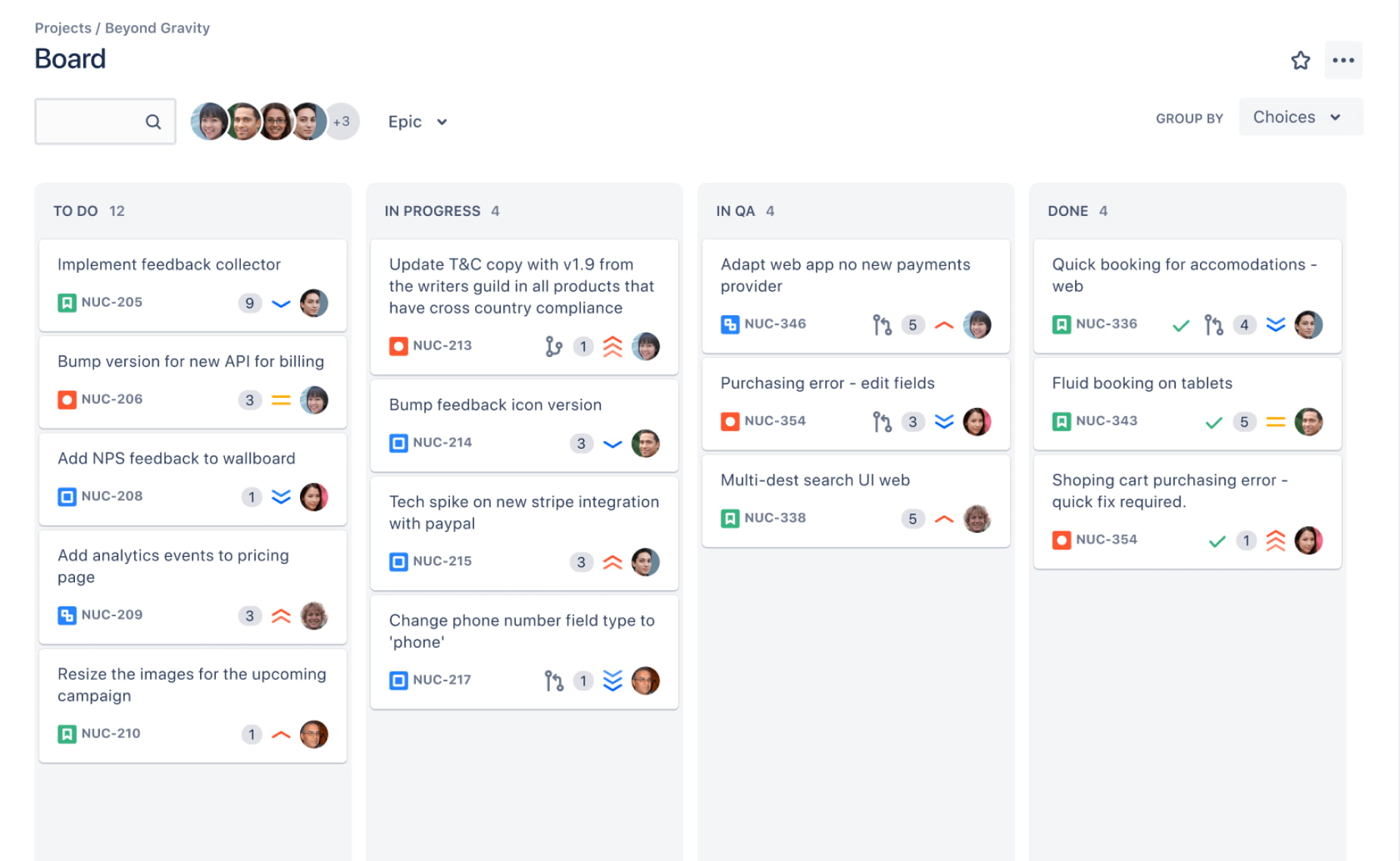
Jira is no longer just a task management tool for developers. In practice, it functions as a structured project infrastructure control cockpit for software teams and IT departments, and other execution-heavy groups. Its natural customer is still not the casual to-do-list user. Jira works for disciplined teams that can absorb some configuration overhead in exchange for process rigor. That same strength, however, is also where pricing starts to matter: the more your organization depends on Jira as operating infrastructure, the less meaningful the headline sticker price becomes.
The Economics of Bundling
In 2026, navigating the Atlassian ecosystem requires a conceptual reset—especially for those who haven’t touched the platform in a few years. Standalone Jira remains focused strictly on issue tracking and workflows. In contrast, Atlassian Cloud provides the shared services layer that binds the entire ecosystem into a unified "System of Work".
This platform layer manages several critical enterprise-grade functions:
- Identity & Security: Managed through Atlassian Guard, this layer provides centralized user management. Features like SSO and SCIM are not inherent to Jira software itself; they are platform services that secure the entire site regardless of which individual products are active.
- Intelligence: The platform hosts the Atlassian Intelligence engine and the Rovo AI platform. While Jira acts as a primary distribution channel for these tools, the AI context is derived from signals across the entire connected ecosystem.
- Data Architecture: High-fidelity tools such as the Atlassian Data Lake and Atlassian Analytics aggregate signals from every connected app. These are Enterprise-level platform features that "listen" to Jira but exist as a separate strategic layer.
- Infrastructure: The platform layer is responsible for global data residency, financially-backed SLAs (up to 99.95%), and administrative sandboxes for safe testing.
For the modern organization, Jira alone is often insufficient. One who requires a holistic project management environment rather than just a ticketing system needs to look into Teamwork Collection. This bundle includes Jira, Confluence, Loom, and Rovo teamwork agents, providing access to Atlassian Platform apps under a single pricing structure.
When evaluating costs, the comparison shifts from individual seat prices to collection-based value. While standalone Jira is significantly cheaper, the Teamwork Collection offers a single price for the entire suite, often including Atlassian Guard Standard in its Enterprise and specific Premium Plans without separate fees.
| Product / Bundle | Standard Plan (per user/month) | Premium Plan (per user/month) |
| Standalone Jira | ~$7.91* | ~$14.54* |
| Teamwork Collection | ~$13.08 | ~$28.08 |
Jira users always treated the platform as their foundational operating environment—the central nervous system for time-tracking, issue management, and ticketing. Every task was funneled into the software to cultivate a durable narrative of its lifecycle, from inception to resolution (or evolution). Atlassian’s marketing still maintains a facade of its legacy simplicity—its customer pricing page offers a free tier, a handful of paid plans, and an enterprise route. Though, the underlying commercial logic has evolved. Atlassian’s own documentation makes this clear: Jira Cloud’s monthly pricing isn't flat, but progressive. The additional revenue components now include the complexities of scale mechanics, governance layers, AI-bundled features, and adjacent ecosystem subscriptions. Plus, the enterprise purchasing journey has shifted toward a more traditional, sales-led experience. Marketplace app pricing also scales with Jira user tiers, so plugin costs tend to rise as your licensed seat count grows.
The Public Jira Plans
The Free Plan with Community Support
It remains accessible for up to 10 users, with 2 GB of storage, limited automation, and support from the online user community only. The Free Plan is best understood as a proving ground, not a durable operating layer. Most of Jira’s real economic logic only begins once a team grows past that threshold.
Jira Standard Plan
Standard is publicly listed at $9.05 per user/month, but that headline figure is just the entry point for a progressive, volume-based model. The "bulk discount" logic is baked into the scale: for a 1,000-seat organization, the cost retreats to $6.40 per user (billed monthly), and for enterprise giants exceeding the 100,000-user mark, the rate plummets to a mere $2.45.
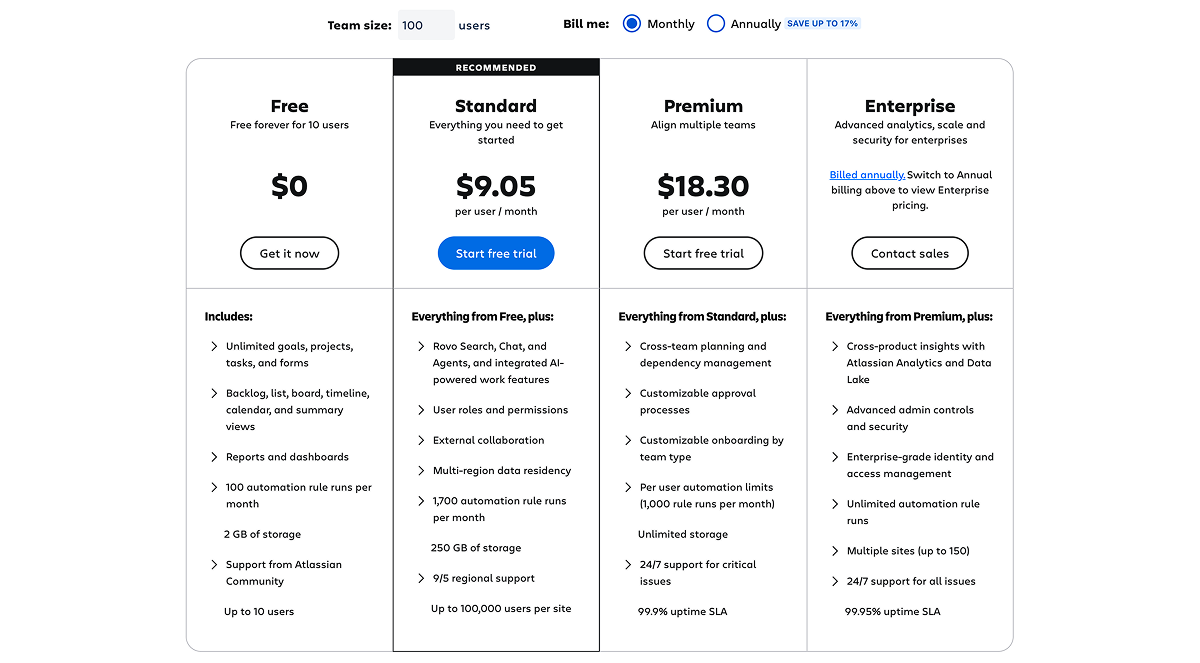
Crucially, Atlassian is no longer positioning Standard as entry-level "Basic Jira". The 2026 iteration now comes bundled with Rovo Search, Chat, and Agents—a clear signal that Jira has evolved into a high-scale distribution channel for Atlassian’s broader AI stack.
The Standard tier is where teams gain granular user roles based access— and the essential guest access—and graduate from the "DIY" community forums to direct company support. Operationally, the plan provides the necessary breathing room for growing teams with 250 GB of storage and a monthly allowance of 1,700 automation rule runs, allowing teams to start codifying their rituals without immediately hitting an administrative wall.
Jira Premium Plan
The Premium plan is priced at $18.30 per user per month. It builds for the larger deployments by introducing cross-team planning and advanced capacity management. It provides expanded task hierarchy levels that map the intricate relationships between work units and visualize how each closed ticket rolls up into larger strategic tasks. It has Release Schedules, giving teams the ability to set and monitor task execution timelines, which brings a certain level of predictability to sprints and day-to-day management. It also lets you set up approvals in a flexible way. It also includes 24/7 Enterprise-grade support and a 99.95% SLA.
Yet, security and governance are not fully “in the box”.
Essential enterprise capabilities like access management (SSO, SCIM), audit logs, data residency, and Active Directory Sync are bundled under Atlassian Guard Standard—a separate, centralized user subscriptions for those not on the Enterprise tier. Consequently, most enterprise buyers are not simply evaluating the cost of Jira; they are pricing Jira plus the mandatory governance layer. Once enterprise-grade identity, advanced admin controls, and organization-wide policy enforcement become non-negotiable, the calculation shifts to a composite of Jira, Guard, integrated apps, and the dedicated administration time required to keep the system running.
Jira Enterprise Plan
In the cynical shorthand of Reddit, "If you are a micro-preneur, 'Contact Sales' means 'You cannot afford this." This is the case in point for the Enterprise tier, which typically becomes the standard for organizations of 500 users or more. It represents the definitive point where Jira transitions from a tactical tracker into a high-gravity command center for organizational intelligence. Industry leaks suggest that at these entry-level thresholds, the Enterprise subscription averages between $28 and $33.00 per user, per month. For massive installations—such as those with 150,000 users—the total cost of ownership can surge past $3,000,000 annually.
At its core is the unification of the Atlassian Data Lake, which aggregates signals from across the entire ecosystem—Jira, Confluence, and Jira Service Management—into a single context layer. This raw data is transformed into high-fidelity visualizations through Atlassian Analytics, offering cross-product insights as well as low-code dashboards that allow business leaders to move beyond simple ticket counting, measuring and overseeing cross-team velocity and DevOps health. If your organization has a wide framework, the Enterprise tier can support multiple sites (up to 150) across Atlassian's global cloud footprint.
Hidden Costs in Cloud Pricing
There are some Hidden Jira revenue drivers which are becoming apparent starting from the Standard subscription tier.
Maximum Quantity Billing (MQB) – Not Directly Price Per User
Atlassian has changed how monthly Cloud annual billing works. Under this model, your invoice is based on the highest number of users assigned at any point during the billing period. If you add users mid-cycle, Atlassian increases the billed quantity and applies prorated charges instantly. Conversely, if you reduce your team size later in that same cycle, you receive zero credit for the unused portion of the month.
For organizations relying on contractors, seasonal bursts, or a fluid workforce, this is a critical distinction that can lead to unexpected billing spikes. While annual subscriptions are marketed as a more economical alternative—with Atlassian noting potential savings of up to 17%—the promised discount is not always a guaranteed win in reality.
Automation as a Monetization Rail
Jira’s automation limits are a prime example of "feature gating by operational pressure". Jira Standard Plan offers 1,700 automation scenario runs per month. Premium plan scales it to 1,000 runs per user. Atlassian has signaled that usage beyond these limits will incur additional consumption-based charges.
Hidden Pricing Tracks
Atlassian does have official pricing paths that matter but do not sit front-and-center on the core Jira marketing page.
The first is Atlassian for Startups, which gives eligible startups up to 50 free seats for 12 months across included products like Jira, Confluence, Loom, Jira Product Discovery, Compass, and Rovo. For a company in the early stages, that's a totally different way of doing things than the usual "Free for 10 users" messaging.
The second pillar of Atlassian’s price-mitigation strategy is its discount ecosystem. What was formerly called the "Community License" is now officially the Social Impact License, offering a significant "exit ramp" from standard enterprise pricing for specific sectors. Atlassian says that eligible community customers can get 75% off Cloud. Academic customers at educational institutions can get 50% off, while Classroom subscriptions—tailored for direct student-teacher environments—are deeply subsidized at 75% off list price. There are some other specified licenses, and for those who qualify, these are the financial oxygen that makes the "Ticket Civilization" sustainable outside the corporate world.
The third is Atlassian Government Cloud, which is outside the normal self-serve flow and has its own published annual pricing grid. Atlassian says that Government Cloud is restricted to eligible U.S. government entities and government-related use cases. The government pricing page on the Atlassian website has information on Jira on Atlassian Government Cloud. It starts at $82,000 annually for 300 users, and goes up from there based on how many users are added.
Jira Pricing Comparison
| Licence/Tier | Public starting price (USD/user/month) | Best for | Notes |
| Free Plan | $0 | Small teams evaluating Jira | 2 GB storage, community support, limited automation |
| Standard Plan | $9.05/user/month | Growing teams that need structured workflows | 250 GB storage, 1,700 automation runs/month |
| Premium Plan | $18.30 | Cross-team planning and higher governance needs | 1,000 automation runs per user, advanced planning, approvals, SLA, multiple identity providers |
| Enterprise Plan | Custom | Large organizations with advanced analytics and centralized control | Data Lake, Atlassian Analytics, multi-site scale, governance-heavy procurement |
The Cultural Cost: The Ticket Civilization
The critical feedback loop surrounding Jira usually hits an unpleasant bump: for all its power, the tool remains an example of over-engineering. The very customizability that allowed Jira to capture the market has become its Achilles’ heel. Even seasoned developers often find themselves flagging, as the tool transforms from a facilitator into a "chronophage"—a black hole that devours hours it was meant to optimize.
The sheer density of features and configuration perks can be paralyzing; extracting real value requires a level of governance that many teams simply aren't prepared for. Onboarding is hard. For the average non-tech user, the platform often feels like a parasitic load on their actual work rather than accelerating it. As a result, the dedicated Jira Administrator becomes a necessity; just check this query on LinkedIn, and you'll see that the issue isn't just made up. That, in turn, gives rise to the "Priest Problem": the Jira Admin becomes a temple priest, required to maintain the order and prevent the "Ticket Civilization" from grinding to a halt.
Who Should Not Choose Jira
Jira is usually the wrong fit for very small teams, low-process creative groups, and organizations that want fast adoption with minimal admin overhead. If your team does not need formal workflows, deep permissions, or backlog-heavy planning, Jira can feel heavier than the value it returns. It is also a difficult economic fit for companies that want a calm all-in-one workspace rather than a layered system of subscriptions, governance add-ons, and expanding marketplace apps spend.
So What’s Jira’s Actual Cost?
For small, disciplined squads, the entry price remains negligible. The Free tier still holds for up to ten users, and Atlassian has bolstered the Standard plan by bundling AI access, guest seats, and basic governance into a respectable sticker price. As the creator of one of the most credible project management software on the market, Atlassian has earned the right to price its dominance accordingly. However, the 2026 reality is a sophisticated, multi-layered commercial machine: progressive seat pricing, MQB spikes, and automation gates. The bill is rarely about the headline number on the landing page; it’s about the total cost of maintaining that surface.
We must acknowledge the weight of legacy inertia. For teams whose daily rituals have been etched into Jira’s workflows for years—and who have the capital to sustain it—uprooting is a monumental task. But when the friction of these escalating costs finally forces a re-evaluation, the opportunity for both savings and structural modernization is profound. The very culture of work is shifting; the market is increasingly populated by hybrid teams where human intelligence collaborates directly with Large Language Models and autonomous AI agents. For large teams, the real cost of Jira is a much broader concept; it’s the lost profit of context loss and of knowledge scattered across the full ticket history.
Compared with other project management tools, Jira tends to sit on the more structured and enterprise-oriented side of the market. Tools like monday.com and ClickUp can feel more flexible for cross-functional work, while lighter systems may offer a lower entry cost and less administrative drag. But Jira still retains an edge for organizations that want rigorous issue tracking, mature workflow logic, and deep operational control.
That said, the more modern comparison is no longer just “Jira versus another task board.” It is Jira versus newer AI-native work environments that try to reduce fragmentation altogether. For these teams we built our alternative: BridgeApp.
The Context-Native Alternative: BridgeApp
BridgeApp is a project management suite for the hybrid era. It combines chat, tasks, docs, and databases into a single context layer where AI agents aren't just bots, but "digital teammates" with access to the organization's durable memory.
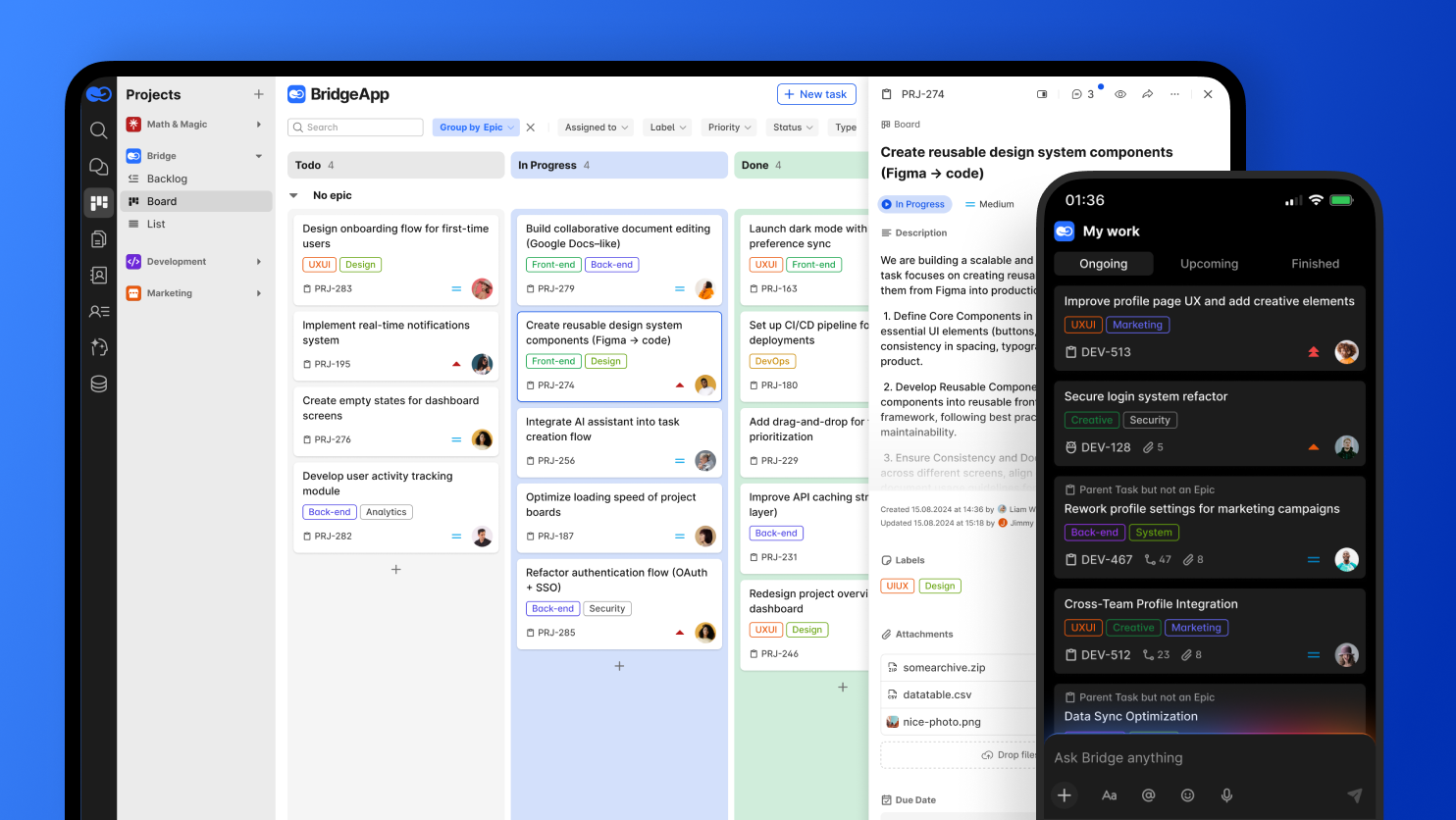
1. Context-Native Execution: Discussions and decisions live alongside the work, meaning you don't have to reconstruct why a choice was made across three different apps. Bridge provides a single, context-aware environment where tasks, threads, and comments coexist alongside institutional knowledge and live data.
2. On-prem Sovereignty: Unlike legacy tools, including Jira, BridgeApp offers an on-premises installation option for teams that need full data ownership.
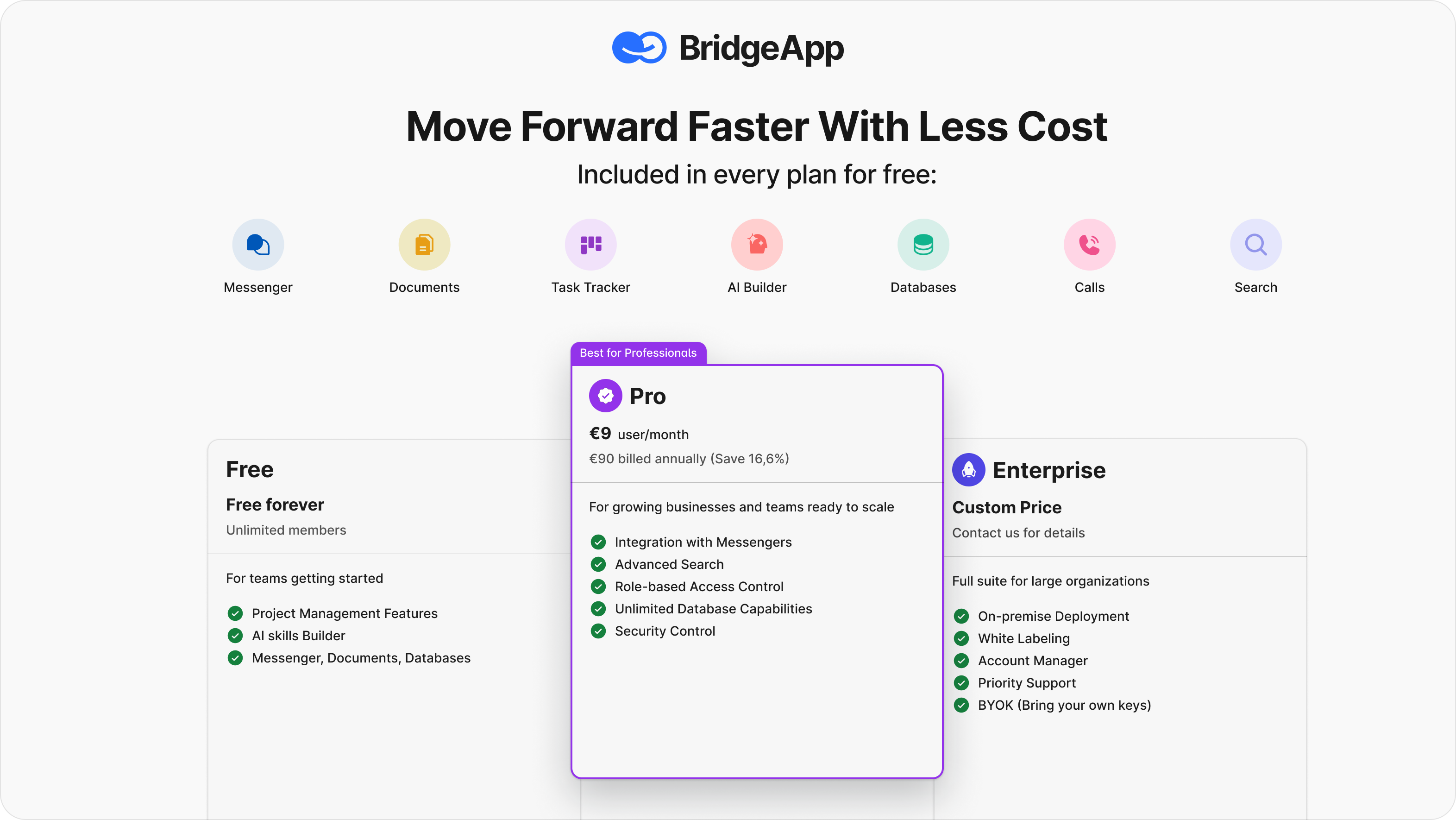
3. Transparent Economics: There is no "Seat-Step Tax" or "Ghost Seat" bundling. BridgeApp disrupts the SaaS staircase with a Pro Plan at €9/user that includes role-based access control, integration with messengers, and an AI-agent builder without hidden "gates."
The best way to evaluate the difference is to experience it. Spin up a live workflow on BridgeApp and see what happens when you prioritize flow over noise.
[Explore BridgeApp's Pricing] | [Request a Demo] | [Start with a Free Plan] | [Talk to the team about Enterprise]
FAQ on Jira Cloud for those who want quick answers
Can I calculate my Jira Cloud costs and find a plan that fits my budget?
Yes. You can use Atlassian’s official pricing calculator to estimate monthly or annual subscription costs based on your user count and product mix. It is especially useful because Jira Cloud pricing follows a progressive per-user model rather than a flat rate.
Is the free plan actually viable for professional use by a small team?
Yes, but mostly as a proving ground. The Jira Free plan supports up to 10 users, includes 2 GB of file storage, and comes with Atlassian Community support, but it also has limitations around permissions, audit logs, apps, and advanced planning features. Most teams that rely on Jira operationally eventually move to Standard or Premium.
What is the main difference between the Standard and Premium plans?
The real difference is operational headroom: Premium adds advanced roadmaps, sandboxes, and release tracks, and unlimited storage, while Standard plan gives teams 250 GB of storage, audit logs, stronger permissions, and standard business-hours support.
When should an organization move to the Enterprise plan?
The enterprise plan functions as a high-gravity command center for organizations with 500+ users that require Atlassian Analytics and a unified data lake to oversee multiple sites. It is the definitive choice for those needing cross-product insights and centralized control over a global cloud footprint.
Can Jira handle enterprise security like SSO out of the box?
Not fully. Organization-wide security controls such as those delivered through Atlassian Guard Standard are sold as a separate cloud subscription layer, while Jira Standard and Premium themselves already include some core security and admin features such as audit logs and, on official plan materials, multi-region data residency options.
Can Jira be deployed on-premises?
Jira Cloud itself is Atlassian-hosted, so it is not an on-prem deployment model. Atlassian still offers Jira Data Center for self-managed environments, including hosting on your own hardware or with IaaS providers such as AWS and Azure.
Are AI capabilities now built into Jira?
Yes. Atlassian says Rovo is now included in all paid Jira Cloud subscriptions, and its AI-powered apps include Rovo Search, Rovo Chat, and Agents. AI can also be disabled by organization admins if needed.
Which alternative to Jira do you offer?
We built BridgeApp as a context-native alternative for AI-native hybrid teams. It combines chat, documents, task tracking, databases, calls, search, and AI builder capabilities in one workspace. Its pricing page also highlights role-based access control in Pro and on-premise deployment in Enterprise.
Is Jira good for corporate task management and project management?
Yes — especially for software development, product work, and process-heavy environments. Jira is strong when teams need structured workflows, permissions, reporting, and a durable operational record, but it can feel heavy for organizations that do not yet have much process discipline. Atlassian’s own plan and feature pages position Jira most clearly for growing teams and structured work at scale.
Is Jira a good choice for highly regulated industries?
Potentially, yes — but the answer depends on the use case. For broad enterprise security and control, the relevant discussion is usually Jira Enterprise plus Atlassian Guard. For U.S. public-sector requirements specifically, Atlassian offers a separate Government Cloud product with its own pricing and eligibility rules for U.S. government entities and related use cases.