BlogIndustry Insights
Google Workspace Pricing (2026): Plans, Costs & Smarter Alternatives

BridgeApp Team
15 min read
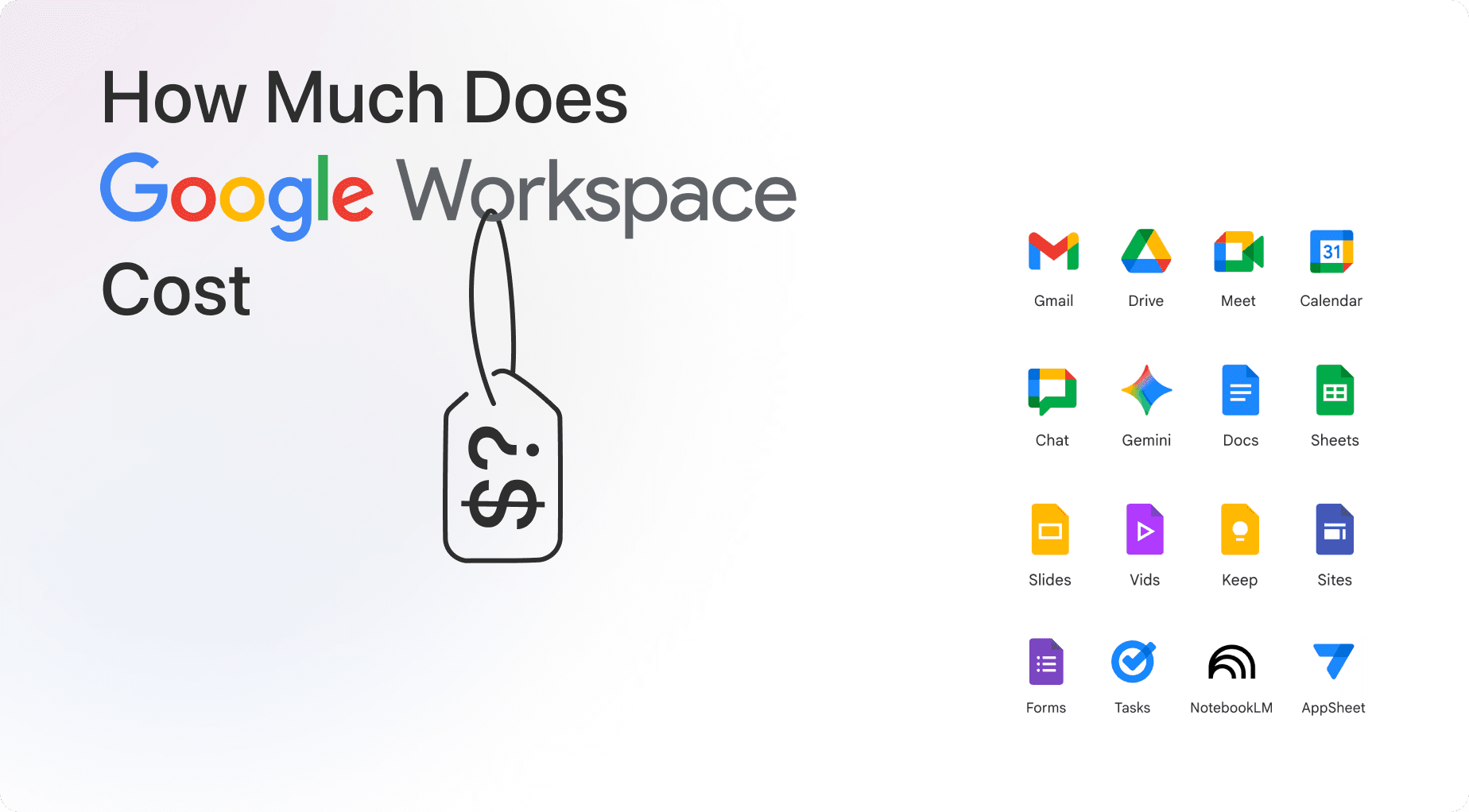
How much does Google Workspace actually cost in 2026? The short answer is $7 to $22 per user per month depending on your plan—but the real answer is more complicated than headline license prices suggest.
Google raised prices by 17-22% in late 2024 after bundling Gemini AI into core offerings, and many teams find themselves paying far more once add-ons, migrations, and overlapping tools enter the picture. This guide breaks down exactly what you’ll pay, what you’ll get, and when an AI-native alternative like BridgeApp might make more financial sense.
Key Takeaways
- Current US list prices: Business Starter costs $7 per user per month on annual plans, Business Standard runs $14, Business Plus hits $22, and Enterprise requires custom pricing through Google sales.
- Total cost extends beyond licenses: Factor in add-ons (Google Voice, Chrome Enterprise Premium), implementation expenses (data migration, training), and potential discounts (annual commitment saves 16%, nonprofits get steep reductions).
- Gemini AI is now bundled: Google integrated AI features into core plans in 2025, raising prices but also changing the value-per-user equation with document drafting, meeting summaries, and smart assistance included.
- All-in-one alternatives can cut costs: BridgeApp combines corporate messenger, task tracker, document collaboration, databases, and AI agents into one platform—potentially replacing 6-7 fragmented SaaS tools and lowering total collaboration spend. BridgeApp offers a free plan for teams getting started, a Pro plan at €9/user/month (€7.5/user/month billed annually), and Enterprise at custom pricing.
- Test before committing: Google offers a 14-day free trial, and comparing total ownership costs (not just monthly invoices) will reveal the smartest choice for your team.
Google Workspace Pricing at a Glance (2026)
Google Workspace uses per user, per month pricing with four main business tiers. The prices below reflect US annual-commitment rates as of early 2026.
| Plan | Annual Price | Flexible Price | Storage | Max Meeting Size |
|---|---|---|---|---|
| Business Starter | $7/user/month | $8.40/user/month | 30 GB pooled | 100 participants |
| Business Standard | $14/user/month | $16.80/user/month | 2 TB pooled | 150 participants |
| Business Plus | $22/user/month | $26.40/user/month | 5 TB pooled | 500 participants |
| Enterprise | Custom quote | Custom quote | Unlimited | 1,000+ with streaming |
The maximum user limit for Business tiers (Starter, Standard, Plus) caps at 300 users combined across your organization. Enterprise removes this restriction and targets larger organizations with complex structures.
All tiers include core workspace apps: Gmail, Google Drive, Google Docs, Google Sheets, Slides, Google Meet, Google Calendar, and Chat. Every plan also includes some level of Gemini AI, though capabilities expand significantly at Standard and above. Advanced security features like Google Vault, data loss prevention, and advanced endpoint management only appear in higher tiers.
How Much Does Google Workspace Really Cost?
Per-user license fees are just the starting point. Your actual google workspace cost depends on user count, region, billing model, and add-ons.
Practical example: A 20-person US team on the Business Standard plan with annual commitment pays roughly 20 × $14 × 12 = $3,360 per year. That excludes taxes, VAT, and any extras.
The flexible plan versus annual plan decision matters more than most buyers realize. Flexible billing costs about 20% more per user but allows monthly adjustments without a term commitment. Annual locks in lower pricing in exchange for a one-year commitment—saving approximately $33.60 per user annually on Standard.
Regional pricing varies significantly. UK Starter runs about £5.90, EU and APAC prices often include 20-27% VAT, and some markets like Indonesia see adjusted rates reflecting local purchasing power.
Beyond Google’s own charges, budget for partner consulting fees, data migration projects, staff training ($50-200 per user through partners), and third-party tools used alongside Workspace. Many organizations find these indirect costs add 20-50% to their annual spend.
Google Workspace Plans Explained
Each Google Workspace plan targets different team sizes and use cases. Here’s how to map features to your business needs.
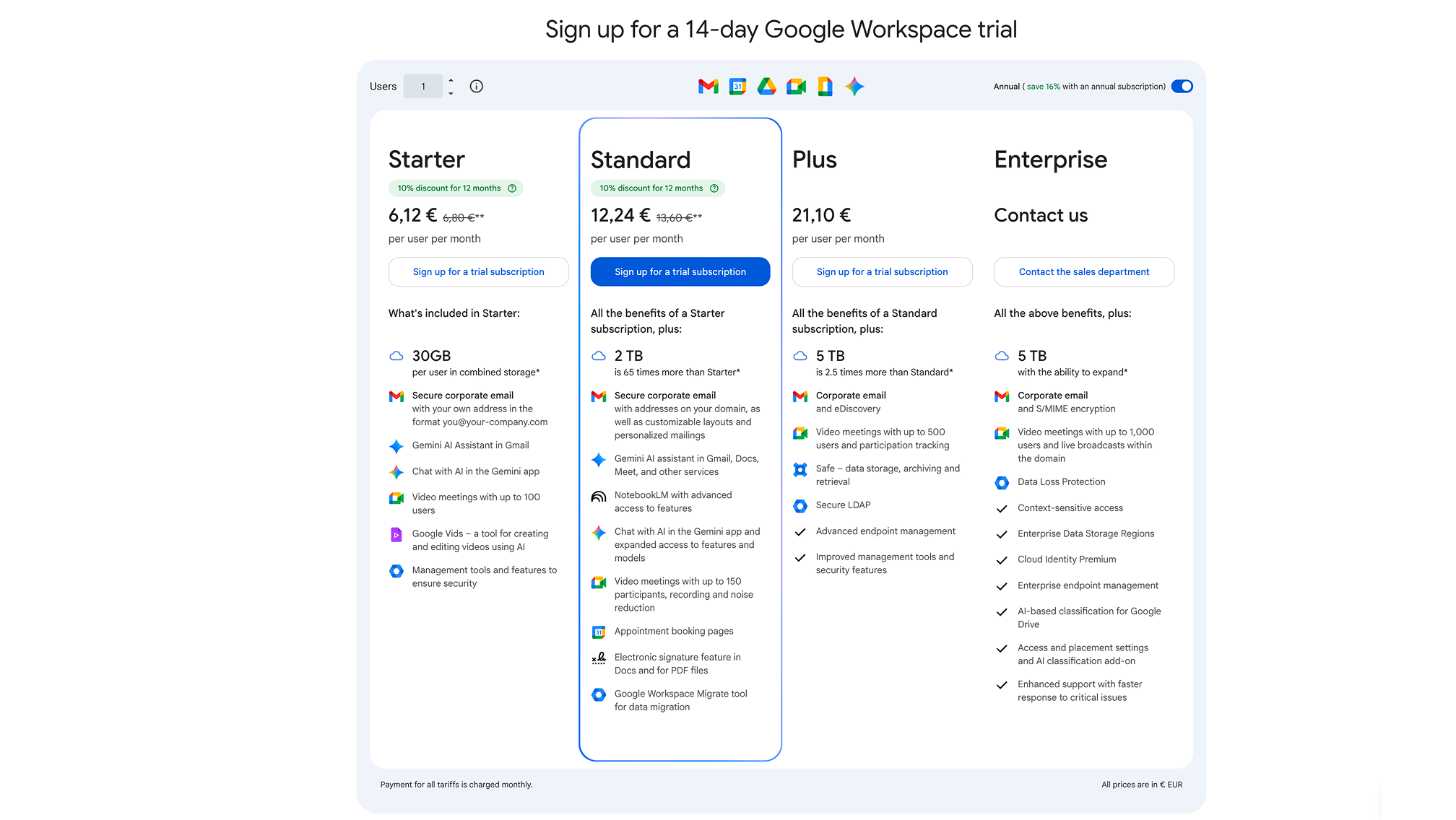
Business Starter: Lowest Cost Entry Point
The Business Starter plan costs $7 per user per month annual ($8.40 flexible) and targets freelancers and micro-teams needing professional email plus basic collaboration.
What you get:
- Custom business email address (you@your-company.com)
- 30 GB pooled storage per user
- 100-participant video meetings (no recording or noise cancellation)
- Basic Gemini AI in Gmail and the standalone Gemini app
- Standard 24/7 support
Limitations to consider:
- No Google Vault for eDiscovery
- No data loss prevention rules
- Restrictive administrative controls
- No shared drives
Think of Starter as “paid Gmail with your own custom domain” rather than a full enterprise collaboration environment. Teams sharing heavy files (video, design assets) or needing compliance features will quickly outgrow this tier.
Business Standard: Best Value for Most Teams
The Business Standard plan hits $14 per user per month annual ($16.80 flexible) and represents the sweet spot for most SMBs.
Key upgrades from Starter:
- 2 TB pooled storage per user (roughly 65x more effective capacity for most teams)
- 150-participant meetings with recording, noise cancellation, and attendance tracking
- Shared drives for team file organization
- Full Gemini AI across Docs Sheets Slides and Meet
- Enhanced admin controls and management controls
- Appointment booking pages and eSignature in documents
This tier unlocks the collaboration features that matter for remote and hybrid teams: meeting recordings, document drafting AI, and structured file sharing. Most teams of 5-200 people will find Standard covers their needs without the steeper jump to Plus.
Business Plus: Security and Compliance Focus
Business Plus runs $22 per user per month annual ($26.40 flexible) for organizations needing stronger security and compliance tools.
What justifies the extra $8/user over Standard:
- 5 TB pooled storage per user
- 500-participant meetings with attendance tracking
- Google Vault for retention rules and eDiscovery
- Data loss prevention rules
- Advanced endpoint management and device management
- Advanced security controls and context aware access
This tier targets companies dealing with customer PII, financial data, or regulatory requirements. The incremental cost often pays for itself by avoiding separate compliance tools—especially considering the average global data breach costs $4.45 million.
Enterprise: Custom Pricing for Large Organizations
Enterprise has no published price list. You must contact Google sales or a Google partner for quotes, with pricing influenced by seat volume, region, and contract length.
Hallmark capabilities:
- Up to 1,000+ participant meetings with in domain live streaming
- Advanced threat protection
- Context-aware access policies
- Unlimited or very high pooled storage
- Enhanced support SLAs and premium support options
- No user count restrictions (supports unlimited users)
Enterprises often negotiate bundled discounts and migration services. At scale, per-user pricing can drop 20-30% below public SMB rates. This enterprise tier makes sense when compliance, risk management, and centralized IT control matter more than minimizing per-seat cost.
Add-ons, Extras, and Hidden Costs
Base Google Workspace tiers don’t cover everything. Many organizations pay extra for specific google workspace add ons and overlapping tools.
Common Google add-ons:
- Google Voice for telephony: $10-30 per user/month depending on features
- Chrome Enterprise Premium for advanced device security: ~$6 per user/month
- Google AI Ultra for Business: approximately $250/month per organization (discounted until April 2026)
Non-license costs to budget:
- Data migration from legacy mail/drive systems ($5,000-20,000 for mid-sized teams)
- Staff training and change management campaigns
- Third-party integrations (Slack, Asana, etc.) that inflate total spend by 20-50%
- Ongoing admin and IT support time
Many teams end up paying more for their “software zoo” of separate chat, project management, docs, and database tools than they pay for Workspace itself. An all-in-one platform like BridgeApp can consolidate these tools into a single workspace, reducing both cost and context-switching overhead.
Discounts, Free Trials, and Special Editions
Google offers several ways to reduce your effective Workspace pricing:
14-day free trial: Access core productivity tools and custom email with no charges. This applies to all business plans and gives you time to test before committing.
Annual vs. flexible savings: Committing to an annual plan saves approximately 16% versus monthly billing. Business Standard drops from $16.80 to $14 per user/month—that’s $33.60 saved per user annually.
Nonprofit pricing:
- Business Starter: Free for eligible nonprofits (up to ~100 TB shared storage)
- Business Standard: Around $3.50 per user/month in many regions
- Business Plus: Around $6.16 per user/month
Education editions:
- Education Fundamentals: Free for qualifying institutions
- Paid upgrades: Education Standard, Teaching and Learning Upgrade, Education Plus with custom institution pricing
Google workspace discounts can change year to year. Verify current eligibility and offers on Google’s regional pricing pages before budgeting.
How to Choose the Right Google Workspace Plan
Choosing the right google workspace plan comes down to four factors: user count, storage needs, meeting requirements, and security/compliance demands.
Quick decision checklist:
| If you have… | Consider… |
|---|---|
| 1-5 users, basic needs | Business Starter plan |
| 5-200 users, remote/hybrid work | Business Standard plan |
| 150+ users or regulated industry | Business Plus or Enterprise |
| 300+ users or complex domains | Contact Google sales for Enterprise tier |
Example scenarios:
A 10-person startup with standard cloud storage needs and occasional video meetings fits well on Business Standard ($1,680/year). The 2 TB pooled storage and meeting recordings justify the step up from Starter.
A 120-person SaaS company handling customer data and needing audit trails should evaluate Business Plus ($31,680/year) or Enterprise. The advanced security features and Google Vault reduce the need for separate compliance tools.
Factor in growth: if your headcount will double within 12-18 months, choose a tier that avoids constant plan changes. Moving from Starter to Standard mid-contract can cost $10K+ in migration overhead.
Google Workspace vs All-in-One Alternatives (Including BridgeApp)
While Google Workspace is popular, many teams pay for multiple plans across different SaaS tools that collectively cost more than Workspace alone.
A typical stack looks like:
- Google Workspace for email/docs ($14/user/month)
- Slack for messaging ($8.75+/user/month)
- Asana or Monday for tasks ($10.99+/user/month)
- Notion for wikis ($8+/user/month)
- Airtable for databases ($20+/user/month)
- Zoom for video ($15+/user/month)
Total: $25-40+ per user per month on top of Workspace—often exceeding $50/user/month combined. BridgeApp consolidates all of these into a single platform starting at €9/user/month (or €7.5 on annual billing)—with a free tier available for smaller teams getting started.
BridgeApp takes a different approach: It’s an AI-native digital workspace combining corporate messenger (channels, threads, mentions), audio/video calls with AI summaries, task management (Kanban, backlog, list views), collaborative documents, flexible databases, and custom AI agents—all in one platform.
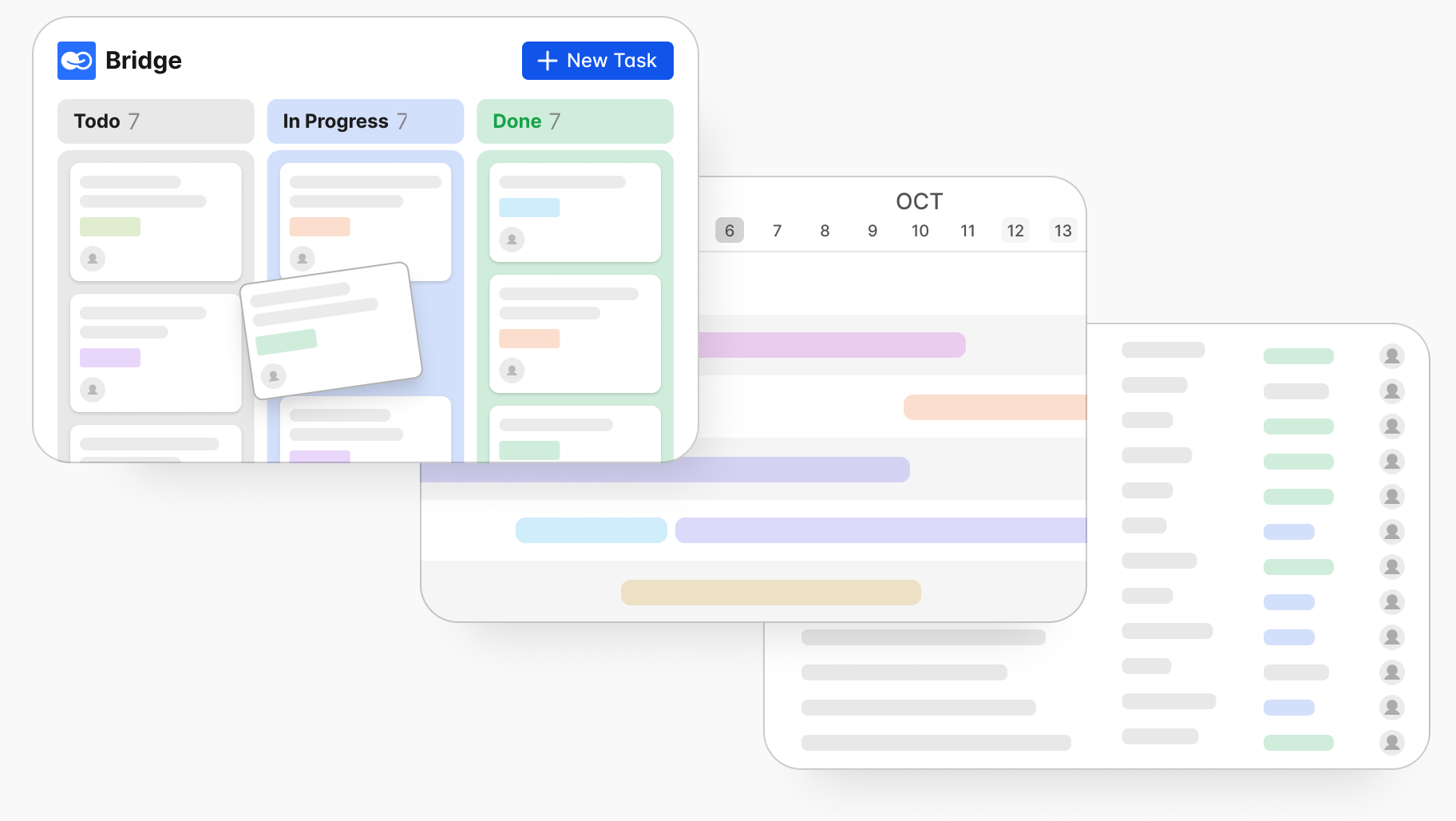
Cost and Value Comparison: Google Workspace + Slack vs BridgeApp
Consider a realistic scenario: your team uses Google Workspace for email plus Slack for messaging, Jira for tasks, Notion for documentation, and Airtable for databases. Total per-user cost easily reaches $40-60/month.
What BridgeApp consolidates:
- Channels and threads for structured communication
- Audio/video calls with AI-generated meeting summaries and action items
- Tasks with subtasks, assignees, deadlines, and multiple views
- Real-time collaborative docs linked to projects
- No-code databases for leads, invoices, assets
- AI agents that create tasks from chats, parse invoices, answer queries from your knowledge base
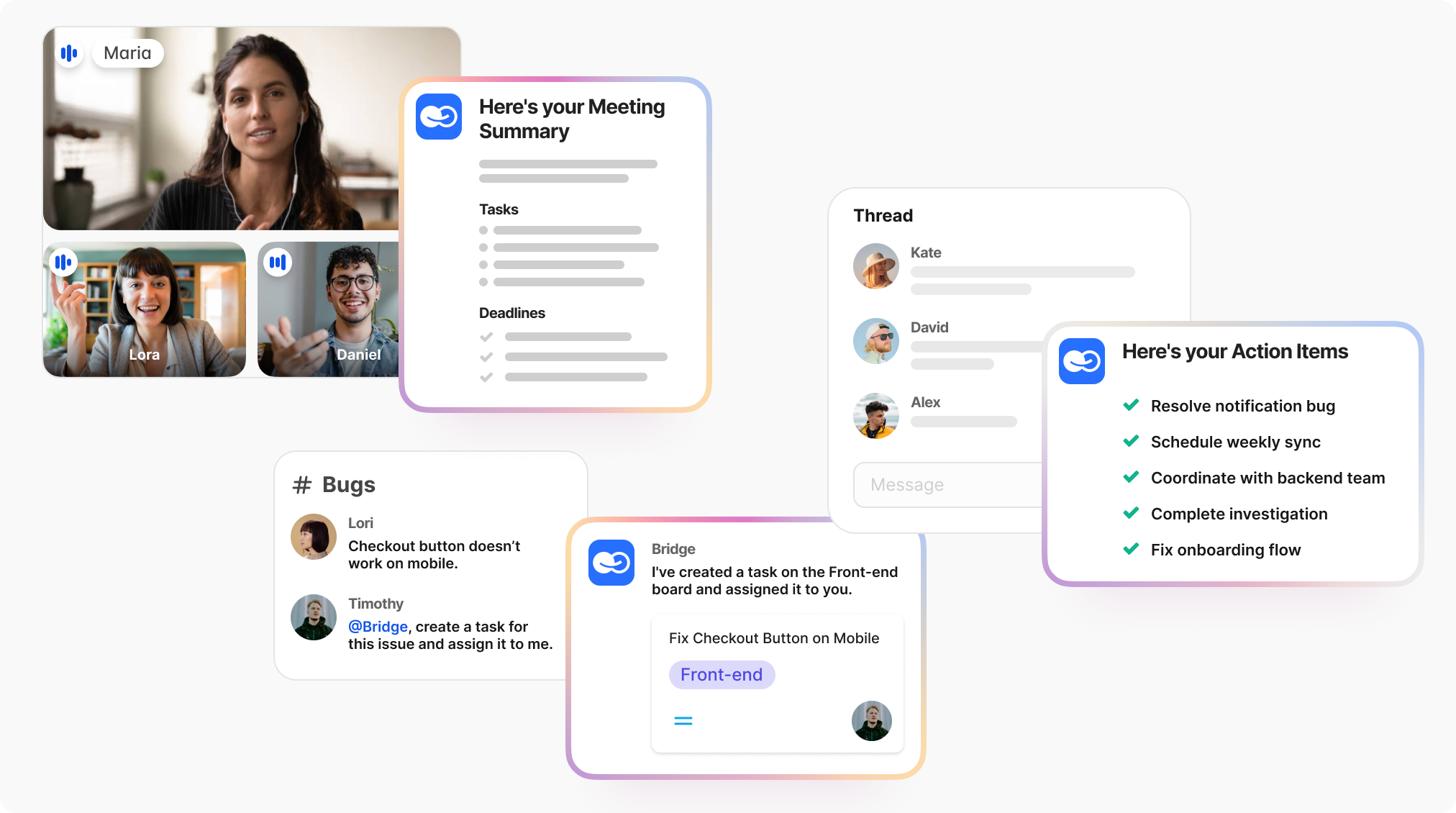
BridgeApp provides unlimited AI usage across all major models (GPT, Claude, etc.) without query limits. Teams gain context-aware automation—not generic AI bolted on after the fact.
Many companies keep Google Workspace for email and calendars while migrating internal communication, projects, and knowledge work into BridgeApp. This hybrid approach preserves existing email domains while gaining better automation and reducing the “software zoo.”
When BridgeApp Makes More Financial Sense
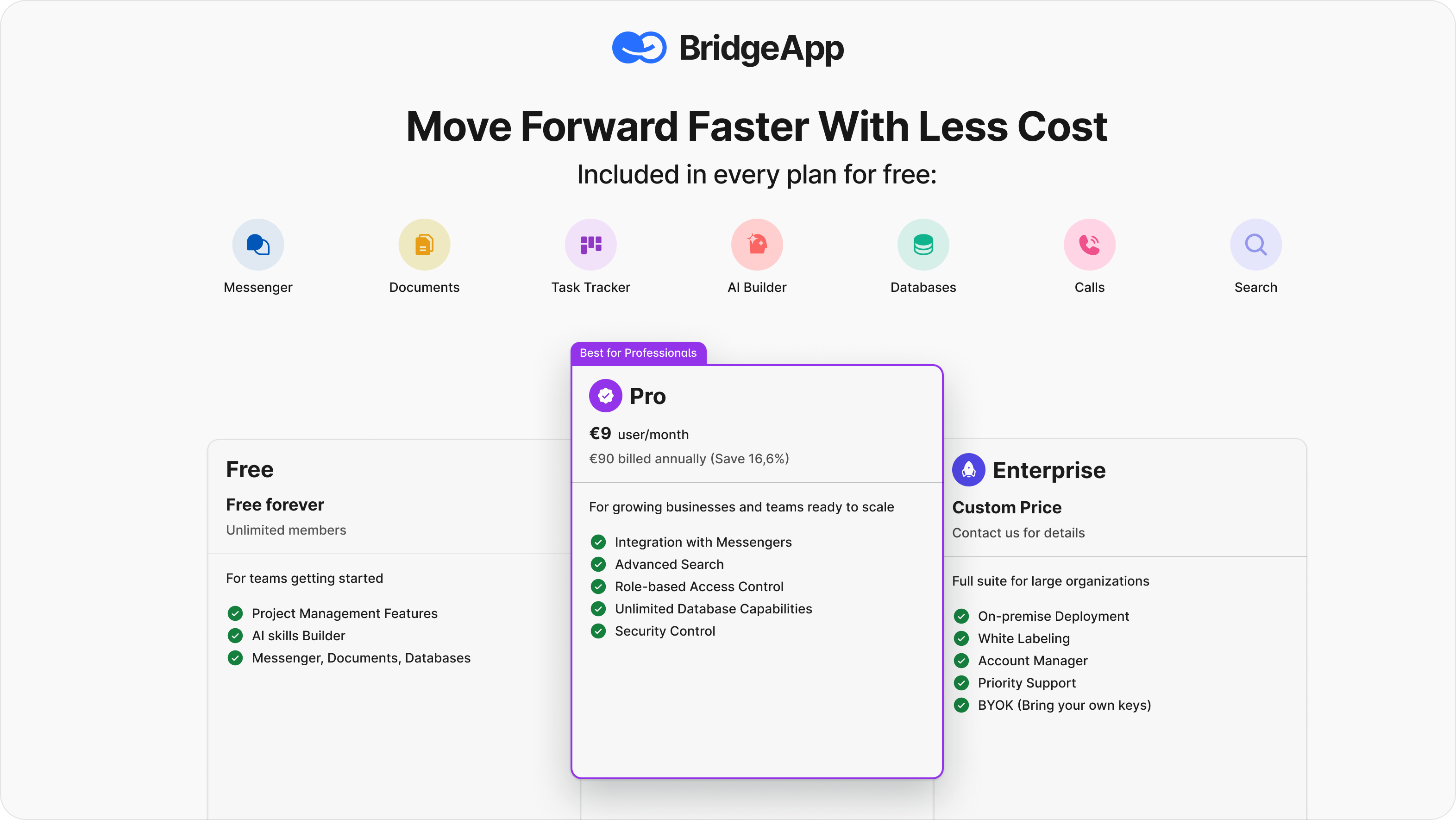
BridgeApp delivers clearer ROI in these scenarios:
Fast-growing teams: A 10-person team using BridgeApp’s AI agents saves approximately 4.6 hours per employee per week (46 hours total weekly). That’s equivalent to one full-time employee’s time—every week—just from eliminating routine work.
Mid-sized organizations: For 250 people, time savings reach roughly 55,200 hours annually. At $30/hour, that’s $1.656 million per year in productivity gains from routine automation alone.
Regulated industries: BridgeApp’s deployment flexibility—cloud, on-premise, private cloud, or hybrid—ensures data sovereignty critical for EU/GDPR compliance, finance, healthcare, and government. No dependency on US cloud providers.
Engineering-heavy teams: Visual no-code AI agent builders let teams automate meeting summaries, ticket triage, invoice parsing, and sales follow-ups without separate AI subscriptions.
Compare total cost of ownership, not just list prices. Include AI costs, automation savings, security requirements, and how many tools you can eliminate. BridgeApp's Pro plan starts at €9/user/month (€7.5 billed annually)—a fraction of what most teams pay running separate tools for chat, tasks, docs, and databases. The platform typically delivers 3-month ROI through consolidated licensing and time savings.
ROI and Long-Term Cost Considerations
Collaboration tools should be evaluated on productivity impact, not just monthly cost.
Google Workspace reduces IT overhead compared to on-premise email servers. But it still leaves gaps—task management, knowledge bases, databases, advanced automation—that require additional paid tools or free plans with limited functionality.
AI features fundamentally shift this equation. When deeply embedded (as with BridgeApp’s agents and call summaries), collaboration tools become “time-savings engines” rather than cost centers. Meeting notes that previously took 20 minutes per meeting happen automatically. Task creation from chat discussions saves 10 minutes per task breakdown. Database queries that took 15 minutes happen in seconds.
Quantify your routine work:
- How many hours weekly go to meeting summaries?
- How much time is spent manually creating tasks from conversations?
- How often do team members search data across disconnected systems?
If that number exceeds 4-5 hours per employee weekly, AI-native platforms like BridgeApp likely deliver positive ROI within months.
Test both options: Use Google Workspace’s 14-day free trial for baseline comparison, then pilot an all-in-one AI-native platform with real teams and real workflows before signing annual contracts.
FAQ
Is Google Workspace worth paying for in 2026 compared to free Google accounts?
For individuals who just need a personal gmail address and occasional documents, free Gmail and Drive work fine. But businesses outgrow free accounts quickly.
Paying for google workspace services unlocks branded email addresses (you@company.com), centralized user management, shared drives, larger video meetings, and Gemini AI for work documents. These matter once you have multiple employees or external clients expecting professionalism.
Some teams keep free plans while centralizing collaboration in platforms like BridgeApp, which provides structured communication, tasks, knowledge bases, and AI agents without requiring Workspace. The deciding factor: how much time you spend hunting through personal inboxes and ad-hoc folders.
Can I mix different Google Workspace plans for different users to save money?
For most small businesses on Starter, Standard, or Plus, licenses are designed for consistent use across your domain with a shared 300-user cap. Mixing tiers is technically limited.
Larger organizations on Enterprise contracts can sometimes mix SKUs (Enterprise Essentials vs Enterprise Plus), but this requires working with Google sales and adds administrative complexity.
A better cost-optimization strategy: reduce the number of separate tools by consolidating chat, tasks, docs, and databases into one platform like BridgeApp, rather than micro-managing Google license mixes.
Are there any hidden costs with Google Workspace I should budget for?
Yes. Common indirect costs include:
- Data migration from legacy systems ($5,000-20,000)
- Staff training ($50-200 per user through partners)
- Premium support or partner consulting fees
- Overlapping subscriptions (Slack, Trello, Notion, Zoom)
- Google workspace add ons like Google Voice or additional monthly cost for advanced features
Many businesses find their total collaboration spend exceeds workspace pricing by 50% or more once these factors are included. Single-platform solutions like BridgeApp reduce subscriptions to track.
How does Google Workspace pricing compare to Microsoft 365 with AI features?
Google Workspace Business Standard at $14/user/month now includes Gemini AI by default. Microsoft 365 Business Standard typically requires adding Copilot at $30/user/month extra—pushing total cost to $42+ versus Google’s $14.
However, Microsoft 365 includes desktop Office apps (Word, Excel, PowerPoint), which some organizations require. Google’s browser-only approach suits teams comfortable working entirely in the cloud.
Compare more storage (2 TB pooled in Workspace Standard vs 1 TB/user in many Microsoft plans), included ai features, and whether your users need offline desktop apps.
When does it make sense to use Google Workspace together with BridgeApp instead of choosing just one?
Many organizations run a hybrid model: Google Workspace handles email, Google Calendar, and external file sharing, while BridgeApp serves as the internal hub for chats, projects, documentation, databases, and AI automation.
This works well when you’re already invested in Gmail addresses and Google Drive but want more structured communication and AI-driven workflows than Google offers alone. BridgeApp’s AI agents connect to external tools via APIs, meaning you keep existing email domains while moving day-to-day collaboration into BridgeApp.
Start with a pilot: leave Gmail/Calendar in place but shift one or two departments’ projects into BridgeApp to measure actual time and cost savings before scaling organization-wide.