BlogIndustry Insights
Top CI/CD Tools: Features, Benefits, and How to Select the Right One

BridgeApp Team
15 min read
CI/CD tools automate code integration and deployment processes, turning what used to be a manual, error-prone release cycle into a repeatable, reliable pipeline. Continuous integration means every code change triggers automated builds and tests. Continuous delivery and continuous deployment extend that automation all the way through staging and into production environments.
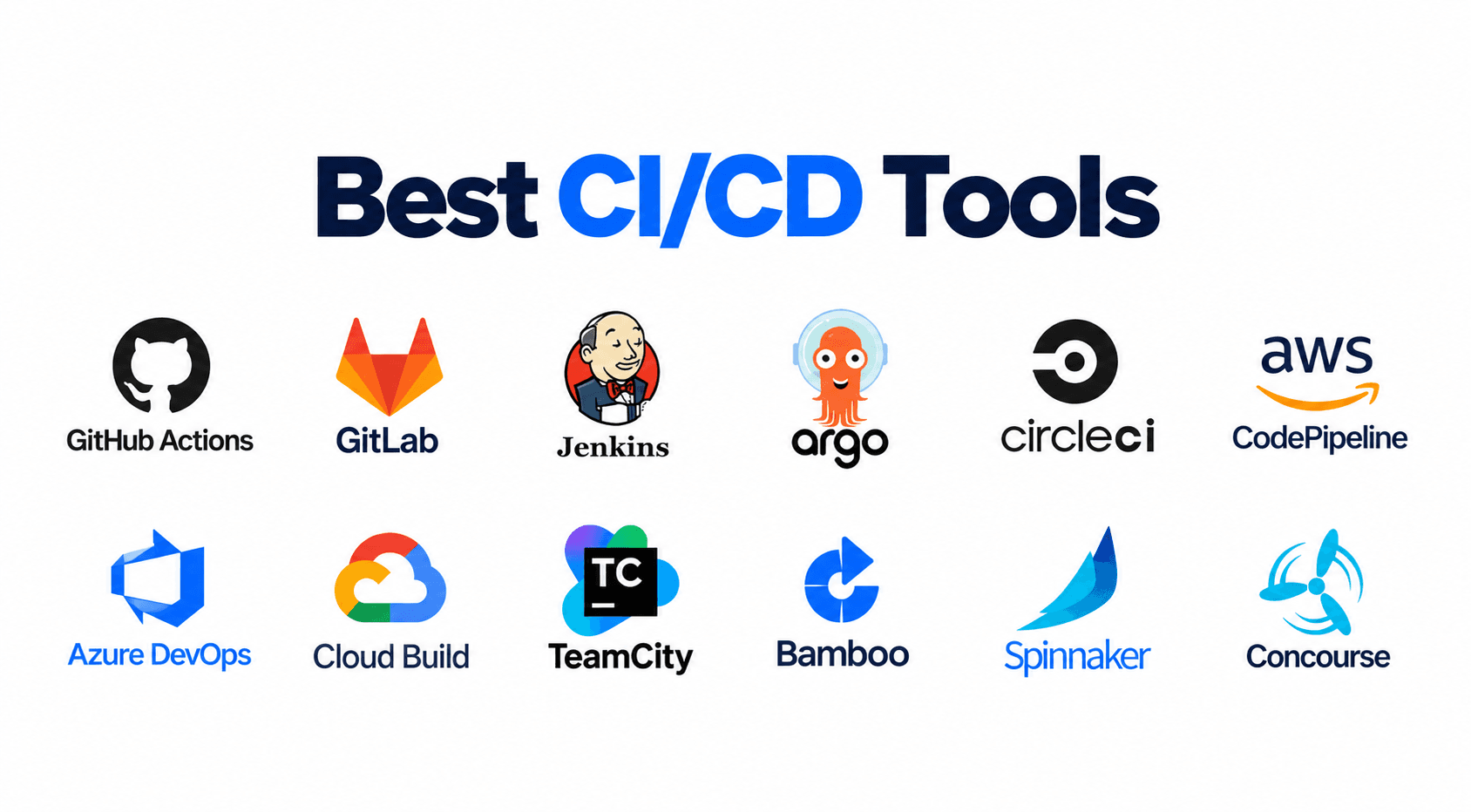
Why does this matter? CI/CD aids faster release cycles, and early bug detection reduces manual effort and deployment risk. According to recent survey data, 55% of developers regularly use CI/CD tools - and that number keeps climbing. Popular CI/CD tools include GitHub Actions, Jenkins, CircleCI, GitLab CI/CD, and Azure DevOps, but the landscape now extends to AI-powered platforms that go well beyond traditional pipelines.
Choosing the right tool depends on your team size, tech stack, and workflow requirements. This article evaluates the top CI/CD tools based on real-world usage, developer adoption data, and practical strengths so you can make an informed decision.
How We Chose the Best CI/CD Tools
Rather than ranking tools by popularity alone, we focused on the practical decision-making factors that engineering teams actually care about:
- Integration capabilities. CI/CD tools should integrate seamlessly with version control systems, cloud providers, and the rest of your tech stack. A tool that doesn't connect to your existing ecosystem creates more friction than it solves.
- Ease of setup and pipeline configuration. How fast can a new team member define and modify a deployment pipeline? Declarative YAML, visual editors, and pipeline definitions as code all matter here.
- Scalability. Scalability is crucial as projects grow in complexity - a tool that works for five developers may buckle under fifty. We evaluated how each option handles parallel jobs, growing test suites, and enterprise scale deployments.
- Community and documentation. Strong community support and clear documentation reduce the learning curve and speed up troubleshooting.
- Pricing and total cost of ownership. Free tier availability, per-seat vs. per-minute pricing, and operational overhead for self hosted agents all factor into real-world cost.
- Security and compliance. Security measures should be planned from day one in CI/CD tools. We looked at secrets management, audit logs, and how well each tool supports integrating security into CI/CD - known as DevSecOps. Automated security checks can be integrated into CI/CD pipelines, and CI/CD security practices help identify vulnerabilities early in development.
- Performance and reliability. Automation capabilities are essential for CI/CD tools, but they're worthless if builds are slow or flaky. We prioritized tools that deliver a reliable pipeline in production environments.
Top 8 CI/CD Tools for Software Development Teams
1. GitHub Actions
GitHub Actions is a native CI/CD solution integrated directly into GitHub repositories and facilitates CI/CD workflows without requiring a separate platform. You define workflows in YAML files, and GitHub handles the rest - from spinning up runners to reporting results.
Why It Stands Out
The deep integration with GitHub means zero-setup workflow automation for anyone already hosting code there. Push a commit, open a pull request, or create a release tag, and your pipeline runs automatically. There's no external service to configure or authenticate.
Best For
Teams already using GitHub for version control and open source projects. GitHub Actions has 39% adoption in personal projects and leads with 33% adoption among CI/CD tools in organizational settings, according to JetBrains' 2026 survey.
Key Strengths
- No additional setup required for GitHub users
- A huge marketplace of pre-built actions covering everything from linting to cloud deployments
- Generous free tier for public repos and reasonable limits for private ones
- YAML-based workflow configuration that lives alongside your source code
Possible Limitations
- Limited to the GitHub ecosystem - if your repos live elsewhere, you lose the tight integration advantage
- Can become expensive for large-scale private repository usage with heavy build minutes
2. Jenkins
Jenkins is the veteran open source automation server that has shaped how the industry thinks about CI/CD. It's been around for over a decade and remains a workhorse for organizations that need full control over their build environments.
Why It Stands Out
A massive plugin ecosystem and complete control over build environments make Jenkins uniquely flexible. Open-source tools like Jenkins offer maximum control and flexibility over every aspect of the development process.
Best For
Organizations requiring on-premises deployment and complex workflow customization. Jenkins is used by 28% of organizations for CI/CD, making it one of the most widely deployed cd tools in enterprise setups.
Key Strengths
- Over 1,800 plugins for extensive functionality - it supports virtually any technology stack
- Self-hosted with complete data control over your own infrastructure
- As a free and open source tool, there are no licensing fees
- Strong community and documentation built over more than a decade
Possible Limitations
- Requires dedicated DevOps expertise for setup and maintenance - this isn't a "set it and forget it" platform
- The UI feels outdated compared to modern alternatives, and managing plugin compatibility can be tedious
3. GitLab CI/CD
GitLab CI/CD is an all-in-one DevOps platform integrating CI/CD with source management and security. Instead of stitching together separate tools for issues, code, pipelines, and scanning, GitLab provides a single platform for the entire software development lifecycle.
Why It Stands Out
The all-in-one approach eliminates tool switching between code, issues, and deployments. GitLab's recent 19.2 release introduced "Custom Flows" for agentic automations and an AI Audit Event Report, making it a software delivery platform that's evolving rapidly.
Best For
Teams wanting a unified platform covering version control, CI/CD, security scanning, and project management. GitLab CI/CD is popular with 19% of developers in organizational surveys.
Key Strengths
- Integrated source control, CI/CD, and security tools - including SAST, DAST, and dependency scanning
- Strong security and compliance features with built-in audit logs
- Both SaaS and self-managed deployment options
- Auto DevOps for automated pipeline setup that works out of the box
Possible Limitations
- Can be overwhelming for teams only needing basic CI/CD - the platform's breadth introduces its own learning curve
- Self-managed version requires significant infrastructure management
4. CircleCI
CircleCI is a cloud native CI/CD platform focused on speed and developer experience. It's built for teams that want fast feedback loops without managing their own build infrastructure.
Why It Stands Out
Superior build performance with advanced caching and parallelization features. CircleCI supports fast cloud-native CI/CD with strong Docker and Kubernetes support, and CircleCI is known for its fast feedback loops and scalability.
Best For
Teams prioritizing fast feedback loops and high-performance builds, particularly those working with containerized applications.
Key Strengths
- Excellent build speed and parallel execution via parallel jobs across multiple containers
- Orbs ecosystem for reusable configuration - think of them as shareable pipeline templates
- Strong Docker and Kubernetes native support
- Intuitive YAML configuration with clear documentation
Possible Limitations
- Limited free tier compared to competitors like GitHub Actions
- Primarily cloud-based with limited on-premises options for teams needing to run on their own infrastructure
5. Azure DevOps
Azure DevOps is Microsoft's comprehensive DevOps platform with strong enterprise features. It bundles pipelines, boards, repos, test plans, and artifact management into a single offering.
Why It Stands Out
Enterprise-grade features with seamless Microsoft ecosystem integration. Azure DevOps integrates CI/CD with project management tools, making it attractive for organizations that want everything - from backlog grooming to deployment pipelines - under one roof. It holds roughly 24% usage share in some comparative studies.
Best For
Organizations using Microsoft technologies (.NET, Windows, Azure) and requiring enterprise compliance controls.
Key Strengths
- Integrated project management and artifact management
- Strong Windows and .NET native support with excellent Azure cloud integration
- Flexible pricing model that works even for small teams
- Cloud-agnostic deployment capabilities - despite the Microsoft branding, it deploys to AWS and Google Cloud too
Possible Limitations
- Interface can feel complex for simple workflows - possibly overkill if you just need a CI pipeline
- Less popular in non-Microsoft development environments, where its own ecosystem advantages don't apply
6. TeamCity
TeamCity is JetBrains' enterprise CI/CD server with advanced build management capabilities. It's designed for large, complex projects where build chain visibility and test intelligence matter.
Why It Stands Out
Sophisticated build chain management and excellent observability features. JetBrains is investing heavily in AI governance features, including support for AI agent builds and failure analysis.
Best For
Large development teams managing complex, multi-language projects that need fine-grained control over build dependencies and test history.
Key Strengths
- Kotlin DSL for configuration as code - a step above YAML for teams comfortable with Kotlin
- Advanced test reporting, flaky test detection, and test intelligence that tracks test history across builds
- Professional UI with excellent usability and deep IDE integration from JetBrains
- Growing support for AI-centric workflows, including model flexibility and observability
Possible Limitations
- Higher cost for large teams at enterprise scale
- Requires server setup and maintenance - though a cloud version is available
7. Harness
Harness is a modern software delivery platform with AI-powered deployment intelligence. It focuses on the CD side of the equation, making production deployments safer and more observable.
Why It Stands Out
AI-driven deployment verification and automated rollback capabilities. AI integration in CI/CD tools can enhance delivery speed, and Harness is one of the clearest examples of this in practice - using machine learning to detect anomalies during deployments and trigger automatic rollbacks.
Best For
Teams requiring advanced deployment strategies and production safety controls, particularly those running canary deployments, blue-green, or rolling strategies in the production environment.
Key Strengths
- Visual pipeline builder with drag-and-drop interface - no YAML required if you prefer a visual approach
- Advanced deployment patterns including canary deployments and promotion workflows
- Built-in security and governance features with detailed audit trails
- AI-powered anomaly detection during the deployment process
Possible Limitations
- Higher learning curve for the complex feature set
- Premium pricing may not suit smaller teams or open source projects
8. BridgeApp AI Agents
BridgeApp takes a fundamentally different approach to CI/CD automation. Instead of just automating builds and deployments, it provides an autonomous multi-agent development pipeline where AI agents handle planning, implementation, code review, and pull request creation - coordinated entirely inside a task tracker with a full audit trail.
Why It Stands Out
Autonomous AI agents handle the entire development cycle from task assignment to merge-ready pull requests without manual intervention at most stages. A human reviews the plan, while the system reviews the implementation. This is the working basis for Magic Coder by BridgeApp - an autonomous coding agent that turns tasks into pull requests.
The pipeline works through a defined state machine: Todo → Planning → Plan Review → Execution → Local Code Review → Waiting for Merge. Each step is handled by a specialized AI agent:
| Agent Role | Function |
|---|---|
| Team Lead | Intake, triage, orchestration, assigns tasks between agents |
| System Architect | Inspects code and requirements, authors the technical plan |
| Backend Developer | Implements approved plans, writes tests, opens PRs |
| UI Developer | Implements approved plans for UI-facing work |
| Code Reviewer | Reviews code against the approved plan, approves or bounces back |
Two explicit review loops ensure quality: the Plan Review Loop (System Architect ⇄ Team Lead) repeats until the plan is accepted, and the Local Code Review Loop (Code Reviewer ⇄ Developer) repeats until the code passes review.
The critical guardrail: agents must not move a task to "Done." The pipeline deliberately stops at "Waiting for Merge," leaving the merge decision to a human. This human-in-the-loop design keeps engineers in control of what actually ships.
Best For
Teams wanting to automate the entire development pipeline from task assignment to merge-ready pull requests. Using a CI/CD tool like this is recommended to improve collaboration among developers - both human and AI - while automating deployment and testing tasks to increase developer productivity.
Key Strengths
- Magic Coder autonomous coding agent for end-to-end development automation - linked to real repositories, real branches, real commits, real PRs
- Built-in Task Tracker where AI agents are first-class assignees, indistinguishable from human teammates in the UI
- Visual no-code Agent Builder with modular configuration: Prompt, Variables, Knowledge, Flows, MCP Servers, Skills, Rules, Models, and Communication channels
- A growing skills library, including support for importing external skill packages such as Claude Skills
- Human-in-the-loop by design with plan approval and merge control
- Model-agnostic: teams can select different LLMs per agent, avoiding vendor lock in on any single AI provider
- Transparent limitation-reporting: agents explicitly flag when they can't validate something rather than silently skipping it
- Both cloud and private cloud deployment options for teams needing control over data and infrastructure
- Internal metrics show cost per completed task dropping roughly 10× with the autonomous pipeline
Possible Limitations
- Newer approach requiring adjustment to AI-driven development workflows - teams need to define project briefs, configure agent skills, and establish governance documents
- May require integration with existing CI systems and other tools via MCP server connections
Quick Comparison of the Best CI/CD Tools
| Tool | Best For | Deployment | Free Option |
|---|---|---|---|
| GitHub Actions | GitHub-based teams and open source projects | Cloud (GitHub-hosted) | Yes |
| Jenkins | Maximum customization and on-premises control | Self-hosted | Yes (open source) |
| GitLab CI/CD | All-in-one DevOps platform users | SaaS or self-managed | Yes |
| CircleCI | Build speed and performance | Cloud-first | Limited |
| Azure DevOps | Microsoft-centric orgs and enterprise compliance | Cloud or on-prem | Yes (basic) |
| TeamCity | Complex projects with advanced build management | Self-hosted or cloud | Free for small use |
| Harness | Production-heavy environments with AI safety | Cloud or self-managed | Community edition |
| BridgeApp AI Agents | Autonomous development pipeline automation | Cloud or private cloud | Contact for pricing |
Honorable mention: Travis CI is favored for its simplicity in open-source projects and remains a solid choice for straightforward CI workflows, though its adoption has slowed relative to GitHub Actions and GitLab CI.
How to Choose the Right CI/CD Tool
Choosing a CI/CD tool should consider your source-control platform, deployment targets, and team expertise. Here's how to narrow it down.
Choose Based on Your Version Control System
Your version control system is the starting point. GitHub users benefit most from GitHub Actions - the integration is seamless, and you avoid managing a separate CI service. GitLab CI/CD works best with GitLab repositories, where the pipeline configuration file lives right alongside your code with zero additional tooling.
Tools like Jenkins and CircleCI seamlessly integrate with multiple version control systems, so if you're using Bitbucket, self-hosted Git, or a mix of platforms, these give you more flexibility. Azure DevOps also supports Bitbucket Pipelines and GitHub repos alongside its own Azure Repos.
Choose Based on Team Size and Complexity
For small teams, managed cloud ci tools like GitHub Actions or CircleCI minimize operational overhead. You don't need a dedicated DevOps engineer to keep the lights on.
As complexity grows, modern teams often need advanced features. Pipelines can parallelize tests and automate increasingly complex workflows as a project grows - and tools like TeamCity and Azure DevOps are built for that scale. Continuous integration runs automated tests on every code commit, and at enterprise scale, that means thousands of commits per day across dozens of services.
BridgeApp AI Agents can scale development capacity through automation in a different way: instead of just running more builds faster, they automate the entire development process - from planning through code review - effectively giving your team additional development capacity without additional headcount.
Choose Based on Deployment Requirements
Compare cloud-only vs. self-hosted vs. hybrid deployment options based on your industry and compliance needs.
- Cloud-only (GitHub Actions, CircleCI): fastest to set up, lowest maintenance, but less control over where your code is built
- Self-hosted (Jenkins, self-managed GitLab): full control over your own infrastructure and data, but requires your team to manage servers, updates, and scaling
- Hybrid (Azure DevOps, TeamCity, BridgeApp): mix of cloud convenience with on-premises control for sensitive workloads
CI/CD uses a standardized pipeline of commit, build, test, security check, and release. Advanced deployment strategies - canary deployments, blue-green switches, rolling strategies - vary by tool. Harness excels here with its visual approach to automated deployments and promotion workflows. Consider which deployment patterns your delivery process actually requires before paying for features you won't use.
Security and compliance considerations differ by industry. Regulated sectors need robust audit logs, secrets management, and third party tools integration for vulnerability scanning. Google Cloud Build is worth considering for teams deeply embedded in Google Cloud, as it provides native support for GCP services and container-based builds.
Which CI/CD Tool Is Best for You?
CI/CD significantly accelerates time-to-market for software features and bug fixes. Frequent code merges prevent integration bottlenecks, and CI/CD helps maintain a consistently stable codebase. But the right tool depends on your situation:
- Choose GitHub Actions if you use GitHub and want zero-setup CI/CD automation. It has the largest marketplace, the easiest onboarding, and delivers high quality code workflows with minimal configuration.
- Choose Jenkins if you need maximum control, run custom scripts for complex build chains, and have dedicated DevOps resources to maintain the open source automation server.
- Choose GitLab CI/CD if you want an integrated platform for the entire development lifecycle - from merging code to deploying code to scanning for vulnerabilities - all without tool switching.
- Choose CircleCI if build speed and developer experience are your top priorities. Its parallelization and caching deliver some of the fastest feedback loops available.
- Choose Azure DevOps if your organization runs on Microsoft technologies and needs tight integration between project management, artifact management, and deployment pipelines.
- Choose TeamCity if you manage complex, multi-language projects where build chain visibility, test intelligence, and Kotlin-based pipeline definitions matter.
- Choose Harness if production safety is paramount and you want AI-powered verification during the software release process.
- Choose BridgeApp AI Agents if you want to automate the entire development workflow from task to pull request - effectively turning your task board into an autonomous development pipeline
Automated tests help catch issues early in development, and CI/CD tools automate code integration, testing, and deployment. Whichever tool you pick, the goal is the same: catch bugs early, ship faster, and reduce the risk of every release.
Bringing It All Together
The best CI/CD tool is the one that fits your team's existing workflow and grows with your ambitions. Modern software development requires automation to maintain code quality and speed - smaller frequent deployments simplify rollbacks and debugging, and CI/CD reduces the risk of releasing new features by making every change testable and traceable.
The landscape continues evolving. CI/CD tools enable faster feedback loops for developers, and the newest entrants - like BridgeApp's autonomous agent pipeline - are pushing the boundary from "automate the build" to "automate the entire development cycle." Roughly 64% of companies now generate a majority of their code with AI assistance, and the tools that govern, audit, and orchestrate that AI work are becoming essential parts of how software development teams deliver software.
Our recommendation: start with your version control system's native CI/CD option. If you're on GitHub, use GitHub Actions. If you're on GitLab, use GitLab CI. Then evaluate specialized tools as your needs grow - whether that's Jenkins for maximum flexibility, Harness for production safety, or BridgeApp for autonomous pipeline automation that turns a task ticket into a merge-ready pull request.
The CI/CD tools you choose today will shape how fast and how safely you ship tomorrow. Pick the one that matches where your team is now, and make sure it can take you where you're headed.